How to install ModAPI on your The Forest server

The panel can install the dedicated-server version of ModAPI. Back up first: this changes game files, and only mods specifically marked for dedicated or multiplayer servers should be used.

  1. Stop the server and create a backup.
  2. Click Mod Manager.
  3. Find ModAPI and click Install.
  4. Wait for its status to show Installed.
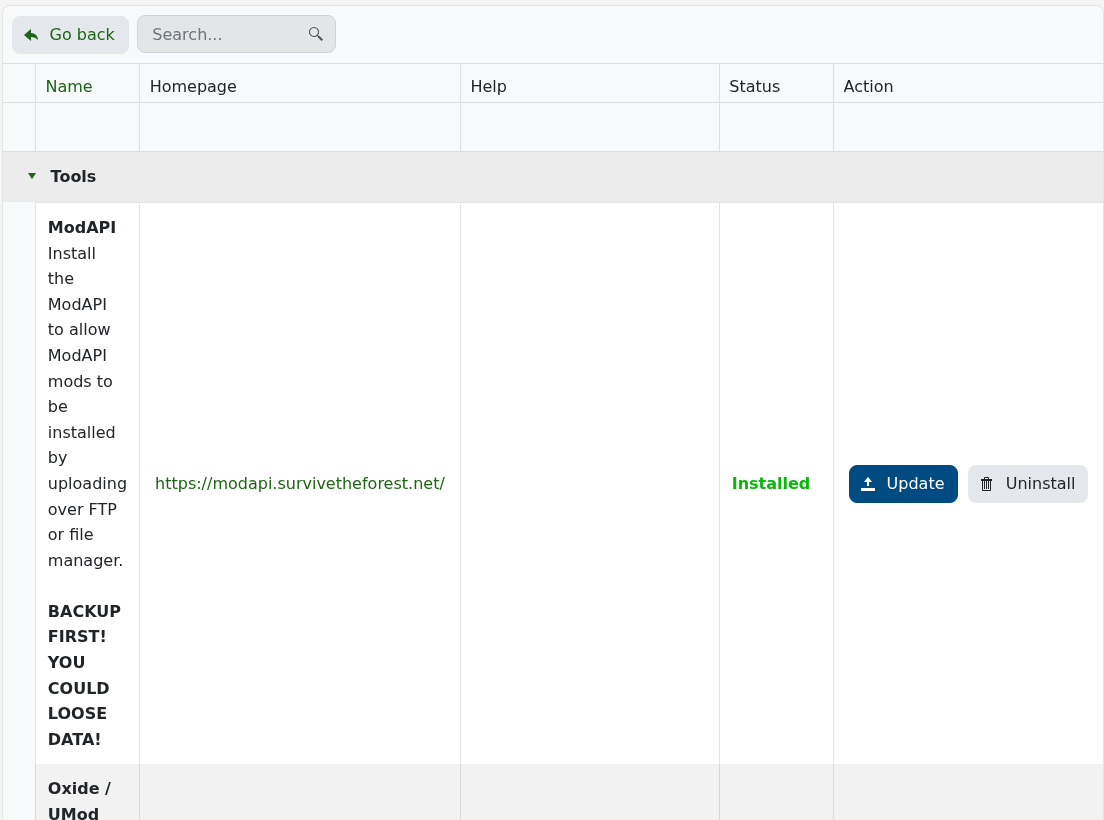
    The Forest Mod Manager showing ModAPI installed

  5. Return to Configuration Files. The installer adds UserConfiguration.xml for ModAPI configuration.
  6. Upload only compatible dedicated-server mod files through File Manager or FTP, then start the server and inspect the ModAPI log.

Many The Forest mods are client-only. Check the author's compatibility notes before uploading anything, and add one mod at a time so a startup failure is easy to trace.

  • 0 Users Found This Useful
Was this answer helpful?

Related Articles

How to configure your The Forest server settings

The Forest keeps its name, passwords, save slot, difficulty and gameplay options in server.cfg....

How to wipe your The Forest server

The current The Forest package does not have a separate Wipe Server button. A fresh world is...

How to join your The Forest server

When The Forest is running, the quickest route is the Join button beside the service's game...

How to become an admin on your The Forest server

The Forest uses an admin password rather than a list of player IDs. Anyone who knows this...

How to change The Forest save slot and autosave interval

The slot setting chooses which of five world saves the dedicated server loads....