In this guide, we will teach you how to check your ping to your server.
Step 1
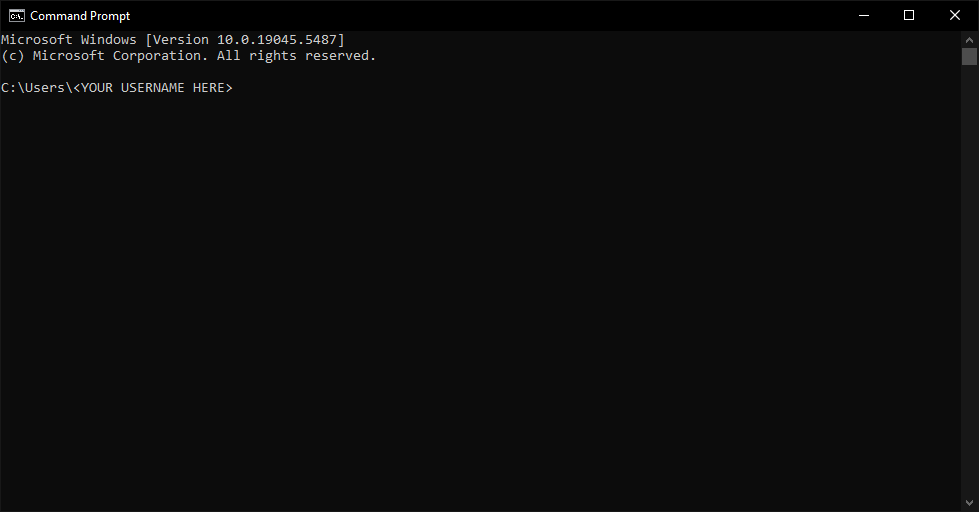
Open the command prompt. If you are on Windows, you can type ‘cmd’ into the Windows Search and press enter. It should look as follows:
Step 2
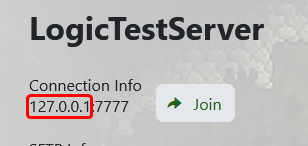
Copy the IP address of your server. It will be similar to the information you use to connect — simply remove the numbers at the end.

Step 3
Input the following command into your command prompt:
ping <IP_ADDRESS>
Replace <IP_ADDRESS> with the address you copied in Step 2.
Once you input that command, press enter and allow it to run. Once it has completed fully, you should get an output that looks similar to the image below.
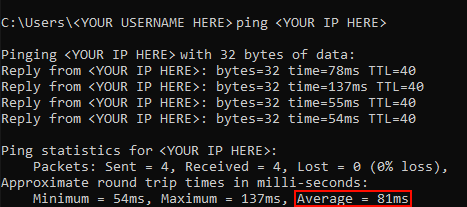
The information you’re looking for is the Average. Anything above 120ms is considered a poor connection.
If you consistently have over 120ms of latency to your server, consider sending in a ticket so we can move you somewhere better suited for your connection.
Before you start
Make one change at a time and keep a note of what you changed. If the server is active, warn players before restarting or applying settings that may disconnect them.
If you get stuck
Check the control-panel console or latest log output for errors. If you submit a support ticket, include the server name, the change you made, and the exact error message.
