The public session name and join password are stored in server_config.sii.
- Stop the server and open Configuration Files.
- Click Text Editor beside
server_config.sii. - Change the text inside the quotation marks for
lobby_name. Setpassword, or leave it as empty quotation marks for no password. - Optionally update
descriptionandwelcome_message.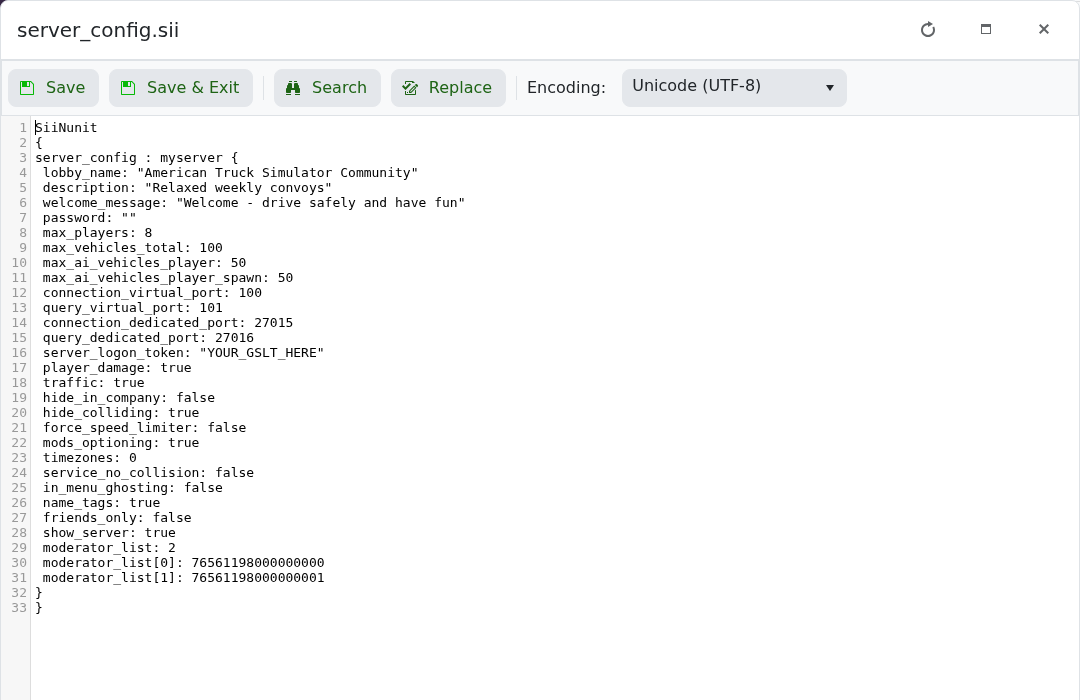
- Click Save & Exit and start the server.
lobby_name: "American Truck Simulator Community"
description: "Relaxed weekly convoys"
welcome_message: "Welcome - drive safely and have fun"
password: "ChooseAJoinPassword"
Keep the quotation marks and the surrounding SII structure intact. The server name and description support up to 63 characters; the welcome message supports up to 127.
