You can ban or unban Minecraft players from Console without editing the ban files manually. Player bans block a username, while IP bans block a connection address.
Ban And Unban Players
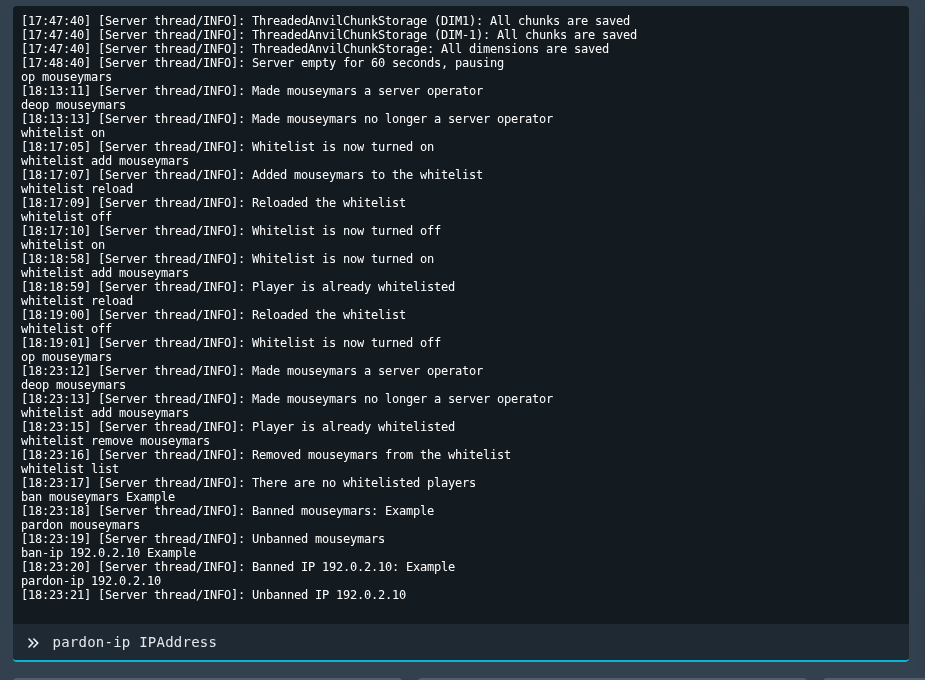
- Open your Minecraft server in the control panel, then open Console.
- Ban a player with:
ban PlayerName reason
- Ban an IP address with:
ban-ip IPAddress reason
- Unban a player with:
pardon PlayerName
- Unban an IP address with:
pardon-ip IPAddress
You can also review banned-players.json and banned-ips.json in File Manager while the server is stopped.
Check the player identifier
Use the exact identifier the game expects, such as a username, SteamID64, UUID, or player ID. Copy it carefully, because one wrong digit or character can apply the change to the wrong player or stop it working.
After making the change
Restart the server if the game requires it, then test with the affected player. If the change does not apply, check the console or log output for permission or formatting errors.
