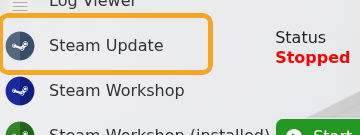
Use Steam Update when Project Zomboid releases a server update, players report a version mismatch, or you need to repair the dedicated-server files. Create a backup first if the server has active progress or custom configuration.
- Open your Project Zomboid server in the control panel.
- Click Backup Server if you need a rollback point.
- Click Steam Update.
- Wait for the update task to finish. Do not restart the server while the update is still running.
- Start or restart the server.
- Join the server or check the console to confirm the version mismatch is resolved.
If the server does not start after updating, check recent mod or configuration changes first, then restore a backup or submit a support ticket with the latest console output.
If you use Workshop mods, confirm the client and server are using compatible mod versions after the update.