如何在 Soulmask 服务器上更改保存和备份间隔

列印
  • 0

Soulmask 将其自动保存和游戏内备份间隔以秒为单位存储。这些与 TCAdmin 中的手动 Backup Server 操作是分开的。

  1. 停止服务器并使用文本编辑器打开 Engine.ini
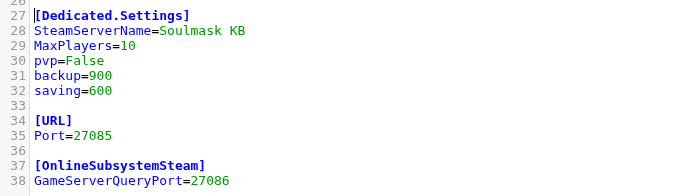
  2. [Dedicated.Settings] 下,将 saving 设置为保存间隔,将 backup 设置为备份间隔。

    Soulmask 专用服务器的 Engine.ini 设置

  3. 单击 Save & Exit 并启动服务器。
saving=600
backup=900

此示例每十分钟保存一次,每十五分钟创建一次游戏内备份。非常短的间隔会增加磁盘活动,而较长的间隔会增加在意外停止后可能丢失的进度。


這篇文章有幫助嗎?

相關文章

« 返回

Follow us on Social Media

Stay in the loop! Follow our social media accounts and stay up-to-date with the latest news, announcements, tips & tricks and behind-the-scenes insights!