How to change your Conan Exiles server name

Your Conan Exiles server name is shown in the in-game server browser and Steam server lists. Keep it recognisable, especially if players search for it manually.

  1. Open your Conan Exiles server in the control panel.
  2. Click Configuration Files.
  3. Open Config Editor for Engine.ini.
  4. Conan Exiles Configuration Files page showing the Engine.ini editor options

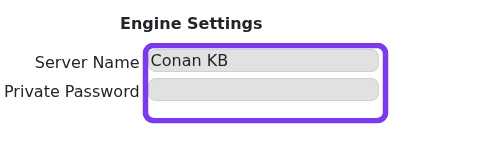
    Conan Exiles Engine.ini editor showing Server Name and Private Password fields

  5. Change the Server Name field.
  6. Save the configuration.
  7. Restart the server.
  8. Refresh the Conan Exiles server browser. Server list updates can take a few minutes to appear.

Name tips

  • Use the community or clan name players already recognise.
  • Avoid changing the name repeatedly, as players may have saved the old name in favourites.
  • Do not put passwords, support details, or temporary test notes in the public server name.

If the old name still appears after a restart, wait a short while and refresh the browser again. Steam and the in-game list can cache server details briefly.

  • 0 Users Found This Useful
Was this answer helpful?

Related Articles

Connecting to your Conan Exiles server

The most reliable way to join a Conan Exiles server is to use the address shown on the server...

How to become an admin on a Conan Exiles server

Conan Exiles admin access is enabled in game with the admin password from your server settings....

How to wipe the world of your Conan Exiles server

Wiping a Conan Exiles server removes saved world data so the server can generate a fresh world....

Restoring your Conan Exiles server to an automatic backup

Conan Exiles stores the main world database in the Saved folder. On the current LogicServers...

How to change a Conan Exiles server password

The private server password is the password players enter when joining the server. It is separate...