Basic Conan Exiles gameplay options are in ServerSettings.ini. These settings affect ownership, map markers, clan size, nudity level, land-claim notifications, and similar server-wide behaviour.
- Open your Conan Exiles server in the control panel.
- Click Configuration Files.
- Open Config Editor for
ServerSettings.ini. - Change only the settings you understand. For sliders, make small adjustments first.
- Save the configuration.
- Restart the server.
- Join the server and confirm the change behaves as expected.
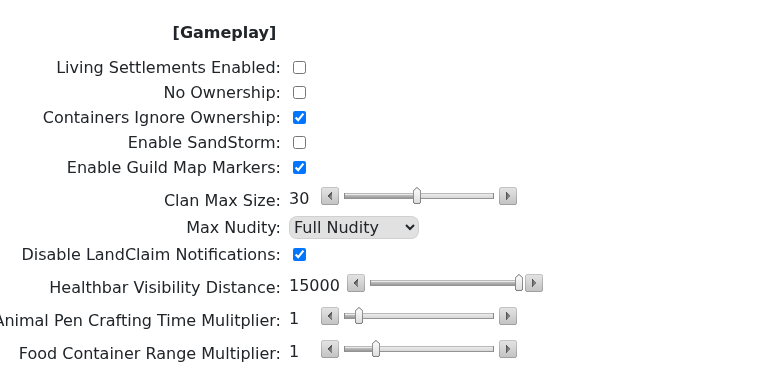
Common starting values
These are not required settings, but they are sensible starting points for many small community servers:
| Setting | Common value | Why players use it |
|---|---|---|
| Clan Max Size | 5 to 10 | Keeps groups manageable on smaller PvE or casual PvP servers. |
| Enable Guild Map Markers | Enabled | Makes it easier for clan members to find each other and coordinate. |
| Animal Pen Crafting Time Multiplier | 0.5 | Speeds up pet and thrall-related waiting without making progression instant. |
| Food Container Range Multiplier | 1 to 2 | Leaves the default behaviour intact, or gives bases a little more flexibility. |
| Disable Thrall Decay | 1 Day or longer | Gives casual players more time away from the server before losing placed thralls. |
| Max Nudity | Server preference | Set this to match the tone and rules of your community. |
Change safely
- Back up the server before changing progression, building, or ownership behaviour.
- Tell players before changing rules that affect clans, land claim, or pets.
- Record the original value before changing a slider so it is easy to revert.
If you are making several gameplay changes, change one group at a time and keep notes. That makes it easier to reverse a setting if players report a problem.
