How to change clan size on a Conan Exiles server

The clan size limit controls how many players can join the same Conan Exiles clan. Raising it can suit larger communities, while lowering it can help smaller PvP servers avoid oversized groups.

  1. Open your Conan Exiles server in the control panel.
  2. Click Configuration Files.
  3. Open Config Editor for ServerSettings.ini.
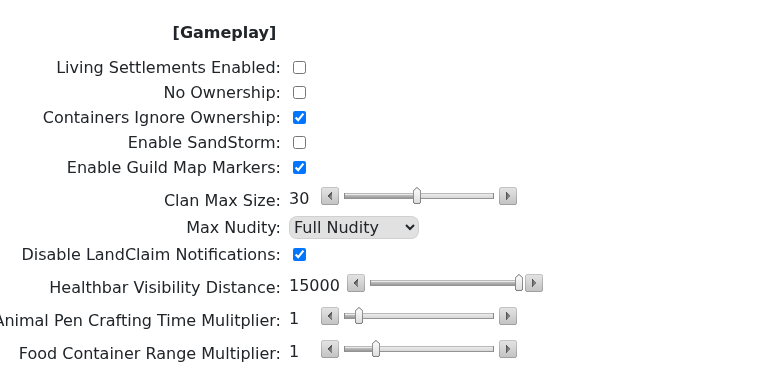
  4. Conan Exiles ServerSettings.ini editor showing basic gameplay settings

  5. Find Clan Max Size and set the new limit.
  6. Save the configuration.
  7. Restart the server.
  8. Ask an existing clan member to check the clan roster limit in game.
Before lowering the limit

  • Warn existing clans before enforcing a smaller group size.
  • Check whether active clans are already above the new limit.
  • Make the change during a quiet period so players can reorganise if needed.

Changing the limit does not automatically reorganise existing clans. If you lower the value below an existing clan's current member count, test carefully before enforcing it on a live community.

  • 0 Users Found This Useful
Was this answer helpful?

Related Articles

Connecting to your Conan Exiles server

The most reliable way to join a Conan Exiles server is to use the address shown on the server...

How to become an admin on a Conan Exiles server

Conan Exiles admin access is enabled in game with the admin password from your server settings....

How to wipe the world of your Conan Exiles server

Wiping a Conan Exiles server removes saved world data so the server can generate a fresh world....

Restoring your Conan Exiles server to an automatic backup

Conan Exiles stores the main world database in the Saved folder. On the current LogicServers...

How to change a Conan Exiles server password

The private server password is the password players enter when joining the server. It is separate...