Gathering, taming and experience rates are controlled in GameUserSettings.ini. A value of 1.0 is the normal rate, 2.0 doubles it and 0.5 halves it.
- Open your ATLAS server in the control panel and stop it.
- Click Configuration Files.
- Find
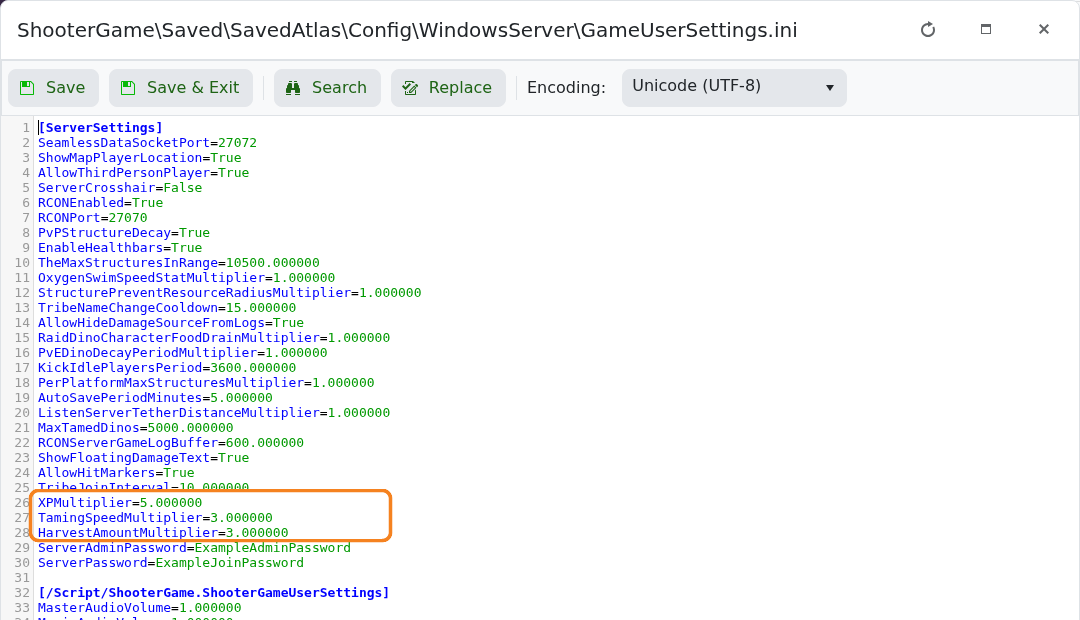
GameUserSettings.iniand click Text Editor. - Under
[ServerSettings], find or add the settings you want to change:XPMultiplier=2.0 TamingSpeedMultiplier=3.0 HarvestAmountMultiplier=2.0
- Click Save & Exit, then start the server and test the new rates.
The example gives double XP and resources with triple taming speed. Change one group of values at a time so it is easy to identify a setting that makes progression too fast or slow.
