How to add a server token to Don't Starve Together

A dedicated Don't Starve Together server needs a cluster token from the Klei account that will own it. Treat the token like a password and do not share it.

  1. Open your service and stop the server.
  2. Click Get Server Token to open Klei's server-token page, then sign in with the Klei account linked to your game.

    Get Server Token button for a Don't Starve Together service

  3. Create a token for the server and copy the complete value.
  4. Return to TCAdmin, click Configuration Files, then Text Editor beside cluster_token.txt.
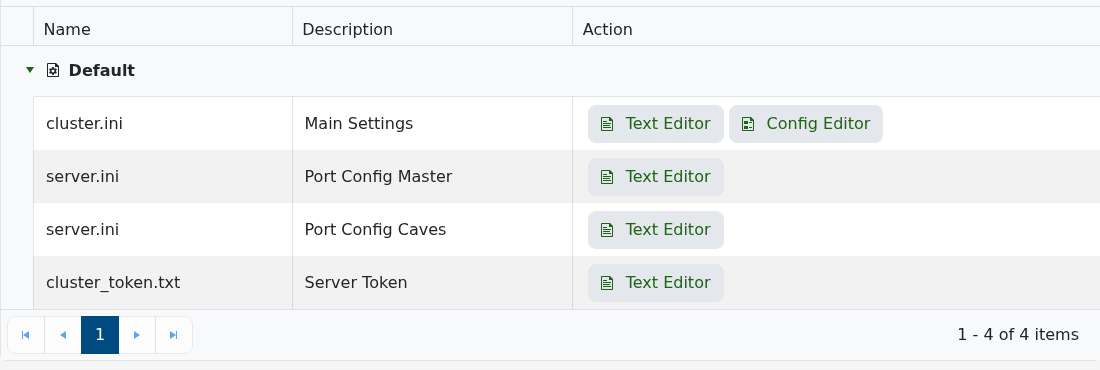
    Don't Starve Together configuration files including cluster_token.txt

  5. Replace the file contents with the token, click Save & Exit, then start the server.

If the server reports an invalid token, generate a fresh one from the same Klei page and replace the old value. Never include the token in a screenshot or support message.

  • 0 Users Found This Useful
Was this answer helpful?

Related Articles

Admin commands for Don't Starve Together

You must add your Klei User ID to the server's adminlist.txt before these commands will work....

How to find and join your Don't Starve Together server

Your server appears in Don't Starve Together's Browse Games list under the name set in...

How to change your Don't Starve Together server name and password

The server name, description and join password can all be changed through the cluster.ini Config...

How to change the game mode and PvP on a Don't Starve Together server

The cluster.ini Config Editor controls the server's game mode, PvP and whether the world pauses...

How to change the player limit on a Don't Starve Together server

The active player limit is stored as max_players in cluster.ini. Keep it within the slot...