How to change the game mode and PvP on a Don't Starve Together server

The cluster.ini Config Editor controls the server's game mode, PvP and whether the world pauses when nobody is connected.

  1. Open the service, create a backup and stop the server.
  2. Click Configuration Files, then Config Editor beside cluster.ini.
  3. Choose the required Game Mode. Survival is the standard experience, Endless allows players to re-enter after death, and Wilderness gives each joining player a random spawn.
  4. Tick Enable PvP only if players should be able to damage one another.
  5. Choose whether to tick Pause When No Players, then click Save & Exit.
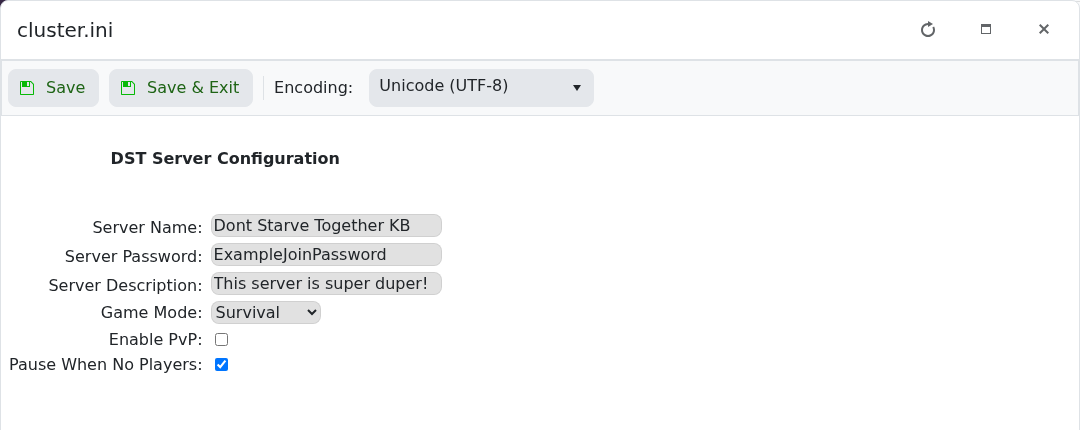
    Don't Starve Together game mode PvP and pause settings in the cluster.ini Config Editor

  6. Start the server and join to check the result.

Changing these cluster settings does not regenerate an existing world. World-generation options need separate world configuration and should not be changed unless you intend to create or migrate a world.

  • 0 Users Found This Useful
Was this answer helpful?

Related Articles

Admin commands for Don't Starve Together

You must add your Klei User ID to the server's adminlist.txt before these commands will work....

How to find and join your Don't Starve Together server

Your server appears in Don't Starve Together's Browse Games list under the name set in...

How to add a server token to Don't Starve Together

A dedicated Don't Starve Together server needs a cluster token from the Klei account that will...

How to change your Don't Starve Together server name and password

The server name, description and join password can all be changed through the cluster.ini Config...

How to change the player limit on a Don't Starve Together server

The active player limit is stored as max_players in cluster.ini. Keep it within the slot...