How to make a player an admin on a Don't Starve Together server

Don't Starve Together identifies administrators by their Klei User ID, which begins with KU_. A Steam ID will not work in adminlist.txt.

  1. Ask the player to copy their Klei User ID from the account information screen in Don't Starve Together.
  2. Open your service and stop the server.
  3. Click File Manager, then open Saved > Config > Cluster_1.
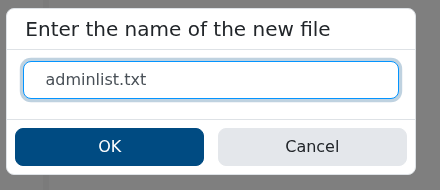
  4. If adminlist.txt does not exist, click New File, enter adminlist.txt and click OK.

    Creating adminlist.txt in the Don't Starve Together Cluster_1 directory

  5. Open adminlist.txt and add one complete Klei User ID per line.

    Don't Starve Together adminlist.txt editor with an example Klei User ID

  6. Click Save & Exit, start the server and have the player reconnect.

To remove an administrator, delete their line and restart the server. Once connected as an admin, use the commands in our Don't Starve Together admin commands guide.

  • 0 Users Found This Useful
Was this answer helpful?

Related Articles

Admin commands for Don't Starve Together

You must add your Klei User ID to the server's adminlist.txt before these commands will work....

How to find and join your Don't Starve Together server

Your server appears in Don't Starve Together's Browse Games list under the name set in...

How to add a server token to Don't Starve Together

A dedicated Don't Starve Together server needs a cluster token from the Klei account that will...

How to change your Don't Starve Together server name and password

The server name, description and join password can all be changed through the cluster.ini Config...

How to change the game mode and PvP on a Don't Starve Together server

The cluster.ini Config Editor controls the server's game mode, PvP and whether the world pauses...