Find your ASKA server in the game's multiplayer browser using its server name and region. ASKA now has server search, so you do not need to browse every page of the list.
- Ask the server owner for the server name, its region and the join password if one is set. Owners can check Server Name and Region by opening Configuration Files, then Config Editor beside
server properties.txt. Close the editor without saving if you are only reading the settings.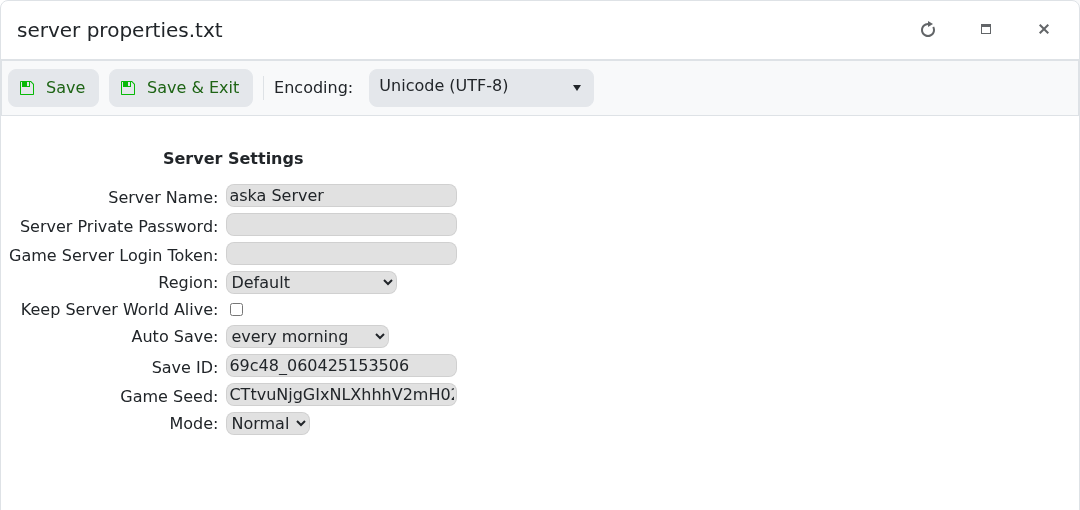
- Start the ASKA service in the game control panel and allow it to finish opening its multiplayer session. The server needs a valid Game Server Login Token before players can find it.
- Launch ASKA through Steam. Choose Multiplayer on the main menu.
- Choose Join.

- Set the browser's region to the region used by the server. Search for its server name, then select the matching entry. Use the server name rather than the panel's IP address.
- Click Join and enter the join password if requested.
If the server is missing, check the region first, clear any filters that exclude it and refresh after startup has completed. Owners should check the latest server output for login-token or session-registration errors. Update ASKA and the server together if the game reports a version mismatch.
