The Death Penalty setting controls what players drop when they die. You can change it independently of combat difficulty by using a Custom world preset.
Using Config Editor
- Stop your Stormforge server in TCAdmin.
- Open Configuration Files, then the
settings.jsonConfig Editor. - Set World Preset to Custom, then choose Death Penalty.
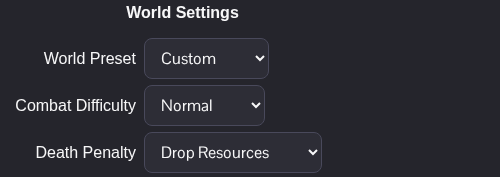
- Click Save & Exit and start the server again.
| Option | JSON value |
|---|---|
| Keep All | KeepAll |
| Drop Resources | DropRecoverable |
| Drop All | DropAll |
The dropdown is easier to use than editing the JSON value yourself. If you've switched from another world preset, check the other Custom options before saving so they suit the way your group wants to play.
Using Text Editor
Stop the server and open the settings.json Text Editor from Configuration Files. Inside worldSettings, change the existing entries to the Custom preset and your chosen death penalty. This example uses Keep All:
"worldPreset": "Custom",
"deathPenalty": "KeepAll"
Use the JSON values in the table above for the other options. Keep the remaining world settings, save and start the server again.
