Stormforge has Normal, Easy, Casual and Hard world presets. Choose Custom when you want to set combat difficulty and enemy health yourself, or combine those choices with different death and durability rules.
Using Config Editor
- Back up your server, then leave it stopped while you edit the settings.
- Open Configuration Files in TCAdmin and click Config Editor beside
settings.json. - Under World Settings, choose a World Preset. The individual controls appear when you select Custom.
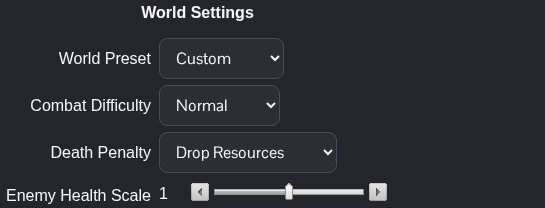
- For a custom world, choose Combat Difficulty and adjust Enemy Health Scale if needed. A health scale of
1is the starting value; lower values reduce enemy health and higher values increase it. - Click Save & Exit, then start the server and reconnect.
The combat choices are Easy, Casual, Normal and Hard. You can change the death penalty, moving storms and durability loss separately with the Custom preset. Dedicated-server world settings are changed in the server configuration rather than a joining player's in-game settings menu.
Using Text Editor
Stop the server, open Configuration Files and choose Text Editor beside settings.json. For a preset, change worldPreset inside worldSettings to Normal, Easy, Casual or Hard. To set the options yourself, edit these existing entries instead:
"worldPreset": "Custom",
"combatDifficulty": "Normal",
"enemyHealthScale": 1
These entries belong inside the existing worldSettings object; keep its other settings. Save & Exit, then start the server for the changes to take effect.
