Find your hosted Fear the Night server among the game’s unofficial servers using its configured session name.
- Open your Fear the Night service in the game panel. If it is stopped, click Start and allow the server to finish starting.
- Open Configuration Files and click Text Editor beside
GameUserSettings.ini. Under[SessionSettings], note the value ofSessionName. Leave the file unchanged and close the editor.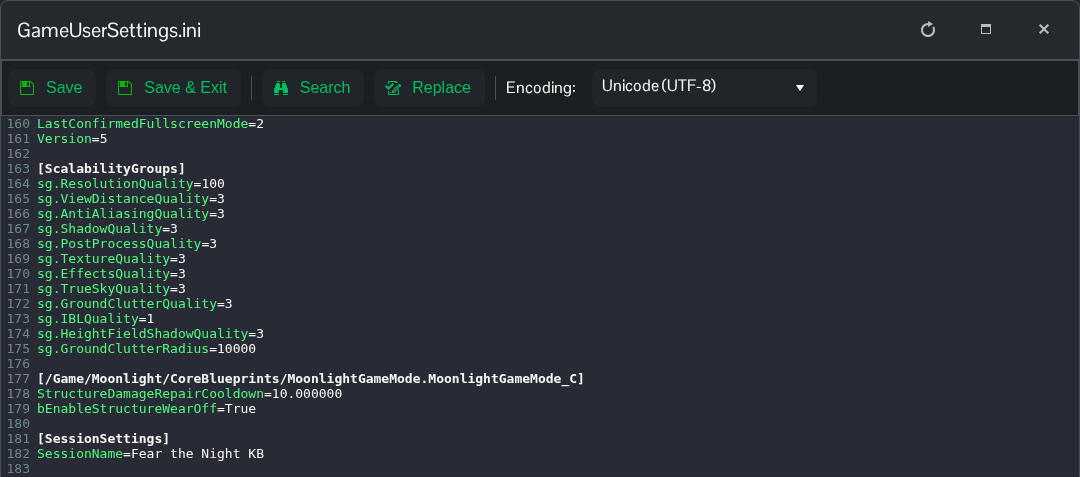
- Launch Fear the Night and choose Join Game. Look for the session name among the unofficial servers. Select the matching server and follow the connection prompt.
- If asked for a password, enter the joining password supplied by the owner. It is the
ServerPasswordvalue under[ServerSettings], separate fromServerAdminPasswordand your panel login.
If the entry is missing after startup, check the session name and that the game client and server are up to date, then try the server list again. If you still cannot find it, contact support with the address under Connection Info and any error message. The panel’s separate Query Info and RCON Info addresses serve queries and remote administration.
