ASKA does not currently expose a separate player-save interval in the control panel. The save interval available for the server is Auto Save, which writes to autosave style inside server properties.txt.
- Open your ASKA server in the control panel, then click Configuration Files.
- Click Config Editor next to
server properties.txt. - Use Auto Save to choose how often the server saves.
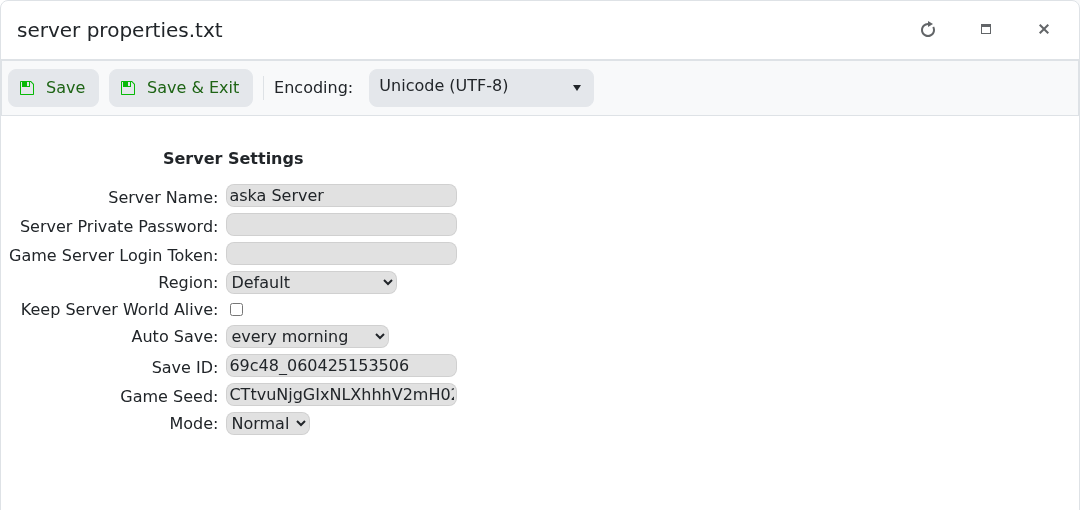
- Click Save & Exit, then restart the server.
If a player appears to roll back while the world looks correct, use a shorter autosave interval and give ASKA time to complete its next autosave before restarting the server.
Before you start
Make one change at a time and keep a note of what you changed. If the server is active, warn players before restarting or applying settings that may disconnect them.
If you get stuck
Check the control-panel console or latest log output for errors. If you submit a support ticket, include the server name, the change you made, and the exact error message.
