Arma Reforger uses game.scenarioId in server_config.json to decide which scenario or mission loads when the server starts. The Config Editor includes the built-in scenario IDs you can copy into the Mission field.
- Open your Arma Reforger server in the control panel.
- Click Configuration Files.
- Open
server_config.jsonwith Config Editor. - Copy one of the built-in mission values shown under the Mission field, or enter the scenario ID required by the scenario you are using.
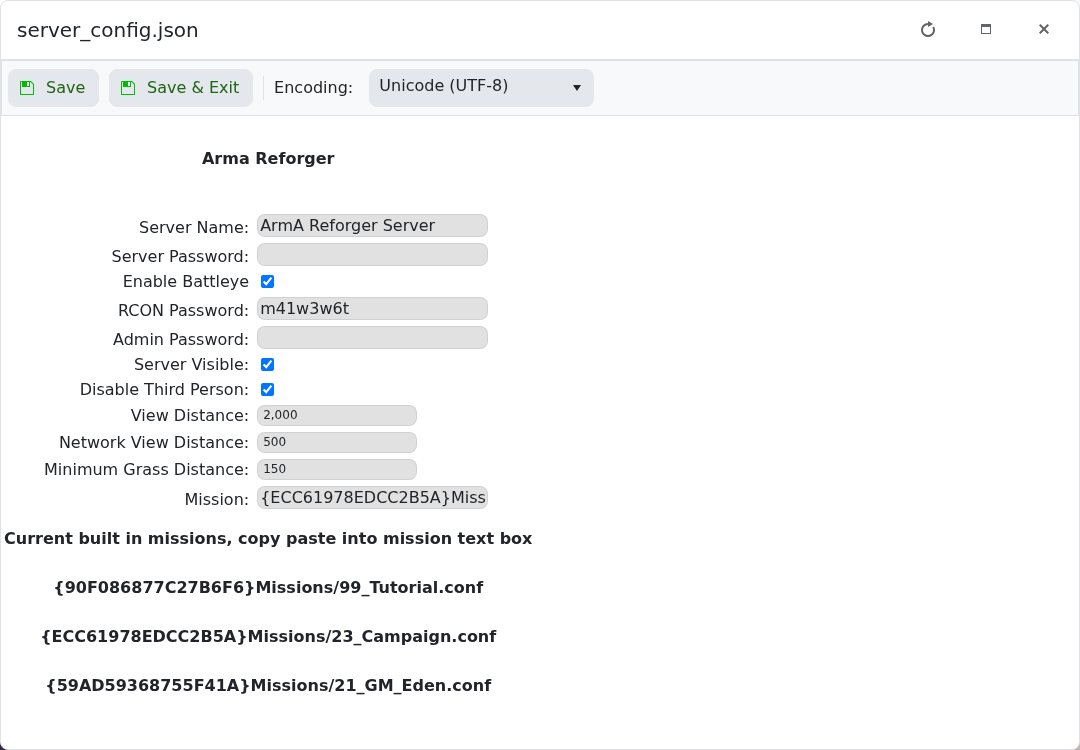
- Paste the scenario into Mission.
- Click Save & Exit, then restart the server.
Built-in examples shown by the panel include:
{90F086877C27B6F6}Missions/99_Tutorial.conf
{ECC61978EDCC2B5A}Missions/23_Campaign.conf
{59AD59368755F41A}Missions/21_GM_Eden.conf
If you use a modded scenario, install the required mod first and use the scenario path listed by the mod author.
