Reverse DNS, also called a PTR record, controls what hostname an IP address resolves back to. It is most commonly used for mail servers, logging, monitoring, and reputation checks.
For normal game servers, reverse DNS usually is not required. For mail services, it matters because many mail providers expect forward DNS and reverse DNS to match.
- Choose a hostname you control, such as
vps.example.com. - Create a normal DNS
Arecord for that hostname pointing to the VPS IP. - Open your VPS service from the client area.
- Open the VPS control panel.
- Find the reverse DNS or rDNS page.
- Set the rDNS value to the hostname and save it.
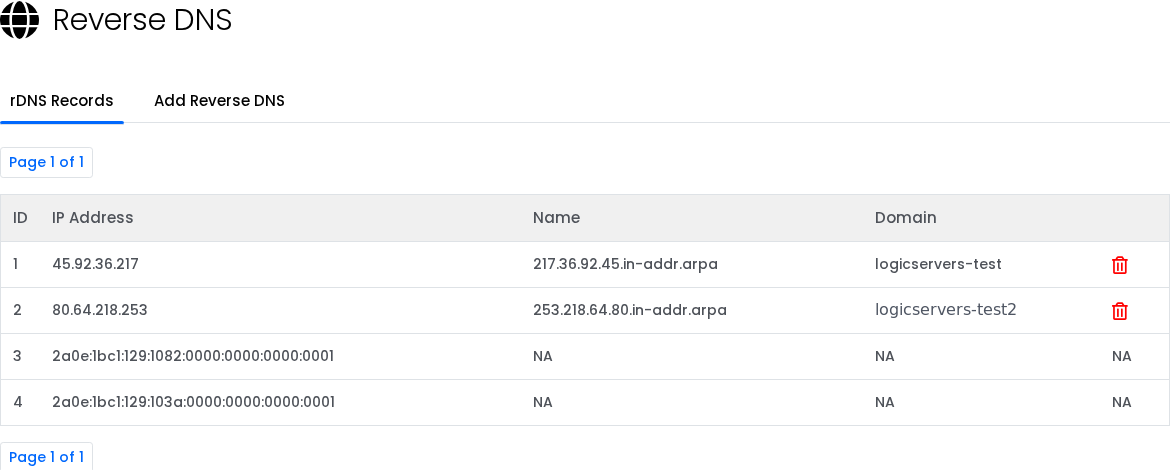
What should match?
| Record | Example | Purpose |
|---|---|---|
| Forward DNS | vps.example.com -> 45.92.36.217 | The hostname points to the VPS IP. |
| Reverse DNS | 45.92.36.217 -> vps.example.com | The VPS IP points back to the hostname. |
Before using it for mail
Reverse DNS is only one part of mail reputation. If you plan to send mail from the VPS, the hostname should have a matching forward DNS record, and the domain should also have SPF, DKIM, and DMARC records configured.
Do not set rDNS to a hostname you do not control. If the forward DNS record does not point back to the VPS IP, many mail systems will still treat the server as suspicious.
Reverse DNS changes can take time to propagate. If a lookup still shows the old value shortly after saving, wait and test again later.
