You'll need your VPS IP address and login details from the setup email. Linux servers are usually accessed with SSH; Windows servers use Remote Desktop. The VPS panel also has a console you can use if either connection fails.
Open your VPS in the panel
- Open your VPS service in the client area, then follow the link to the VPS control panel.
- Find the VPS in the list and click its arrow button.
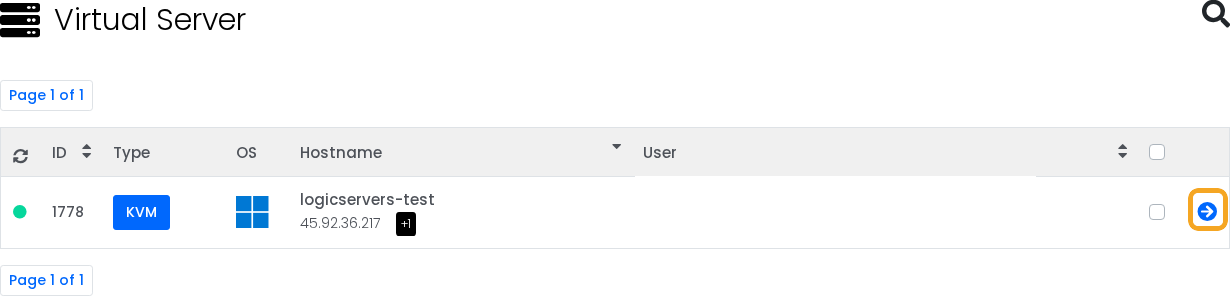
Check that the VPS is running and confirm its IP address before connecting.
Connect to a Linux VPS
Open Terminal on Linux or macOS, or Windows Terminal on Windows, and enter:
ssh root@your-vps-ip
Replace your-vps-ip with the VPS address. Use the username from your setup details if it is different from root. SSH normally uses port 22, unless it has been changed.
On Windows, PuTTY is another option if you prefer a separate SSH client.
Using an SSH key
If you use keys, add the public key to the VPS and keep the private key on your own computer. Test a new key in a second connection before disabling password login, so you can still get back in if something is wrong.
In PuTTY, choose the private key under Connection > SSH > Auth.
Connect to a Windows VPS
On Windows, open Remote Desktop Connection, enter the VPS IP address and sign in with the Windows username and password from your setup details.
On a Mac, use Windows App, which replaced Microsoft's Remote Desktop client. Add a remote PC and enter the same VPS address and login details. Microsoft's remote PC connection guide covers the app setup.
On Linux, you can use an RDP client such as Remmina.
If SSH or Remote Desktop will not connect
Open the console in the VPS panel. It gives you access to the VPS screen even when its operating system is not accepting SSH or RDP connections.
- Click the console icon in the top-right action row.

- In the VNC Information window, click Launch VNC.

This is useful for checking whether the VPS is still booting or recovering access after a firewall change. For everyday work, SSH and Remote Desktop are usually more comfortable to use.
If the console also fails to open, send us a support ticket with the VPS IP address and the error you see.
Setting up a game server
Once connected to a Windows VPS, you can follow Installing SteamCMD on your Windows VPS. For ARK Survival Ascended, continue with How to install or update an ARK Survival Ascended server on a Windows VPS.
