Fail2ban watches logs and temporarily blocks IP addresses after repeated failed login attempts. It is commonly used to reduce SSH brute-force noise on public Linux servers.
Fail2ban works by reading log files, matching failed-login patterns with filters, and applying temporary bans through a jail configuration.
Ubuntu or Debian
sudo apt update
sudo apt install fail2ban
sudo systemctl enable --now fail2ban
AlmaLinux, Rocky Linux, Oracle Linux, or CentOS
sudo dnf install fail2ban
sudo systemctl enable --now fail2ban
If the package is not available, enable the appropriate extra repository for your distribution first.
Create a local jail config
Do not edit jail.conf directly. Create or edit jail.local so package updates do not overwrite your changes.
sudo nano /etc/fail2ban/jail.local
A basic SSH jail looks like this:
[sshd]
enabled = true
port = ssh
filter = sshd
logpath = /var/log/auth.log
maxretry = 5
findtime = 10m
bantime = 1h
On AlmaLinux, Rocky Linux, Oracle Linux, or CentOS, SSH logs may be in /var/log/secure instead:
logpath = /var/log/secure
Common settings
| Setting | What it controls |
|---|---|
enabled | Turns the jail on or off. |
port | The service port Fail2ban should protect. |
filter | The Fail2ban filter used to detect failed attempts. |
logpath | The log file Fail2ban reads. |
maxretry | How many failures are allowed before a ban. |
findtime | The time window Fail2ban counts failures in. |
bantime | How long the IP is banned for. |
ignoreip | IP addresses that should never be banned. |
Whitelist your own IP
If you have a fixed home or office IP, add it to ignoreip so you do not lock yourself out while testing:
[DEFAULT]
ignoreip = 127.0.0.1/8 YOUR_IP_ADDRESS
Only add IP addresses you trust. Do not whitelist broad public ranges unless you understand the security impact.
Restart and check Fail2ban
- Restart Fail2ban after changing the jail config:
sudo systemctl restart fail2ban
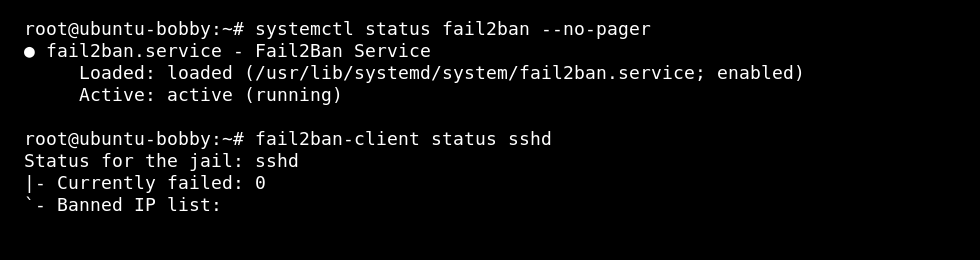
- Check the Fail2ban service and jail status:
sudo systemctl status fail2ban --no-pager
sudo fail2ban-client status
sudo fail2ban-client status sshd
Unban an IP address
sudo fail2ban-client set sshd unbanip IP_ADDRESS
View Fail2ban logs
sudo journalctl -u fail2ban --since "1 hour ago"
sudo tail -100 /var/log/fail2ban.log
Fail2ban is helpful, but it is not a replacement for SSH keys, strong passwords, updates, and a sensible firewall.
