Palworld memory use grows as players explore, build bases, assign worker Pals, leave items around, and install mods. The slot count is only part of the calculation; an older 4-player world can use more RAM than a fresh 8-player world if it has a lot happening in it.
Use the recommendations below as a starting point, then check the live memory graph while players are online. If memory stays close to the limit, upgrade before the server starts freezing, restarting, or rolling saves back.
Recommended RAM
| Server use | Recommended RAM | Notes |
|---|---|---|
| Small private server, 1-4 players | 6 GB minimum, 8 GB preferred | Suitable for a new world with light base activity. |
| Regular group, 5-8 players | 8-12 GB | Use the higher end when several players are online together. |
| Busy world with many bases | 12-16 GB | Better once breeding, base workers, and explored areas build up. |
| Modded or long-running community server | 16 GB or more | Mods and older worlds can increase memory use significantly. |
- Open your Palworld server in the control panel.
- Check the live Memory bar while players are online.
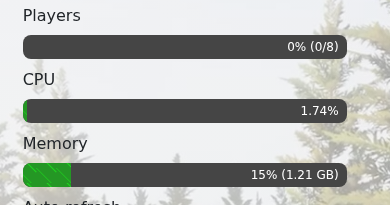
- If memory is above about 80-90% during normal play, reduce load or upgrade the server.
- If the server is already crashing, freezing, or rolling back, take a backup before changing anything: How to Backup your Palworld Server.
Common memory-heavy causes are large bases, lots of assigned Pals, many dropped items, mods, long uptime without restarts, and several players exploring different areas at once. If you need more memory, upgrade the service from the client area or submit a support ticket with the current memory usage and player count.
