PvP allows players to fight each other on the Palworld server. Enable it only if your community wants player-versus-player combat, and check the nearby damage/drop settings before restarting.
- Open your Palworld server in the control panel.
- Click Configuration Files.
- Open
PalWorldSettings.iniwith Config Editor.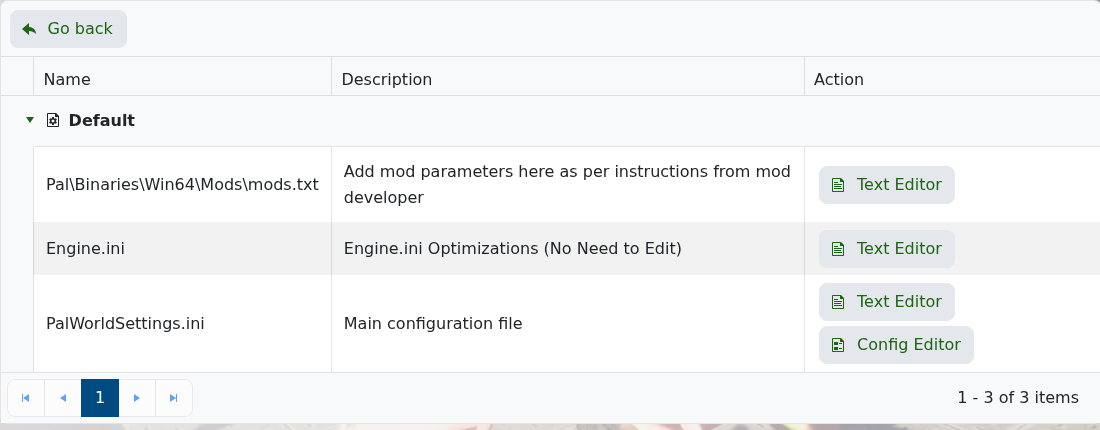
- Scroll to the Player VS Player section.
- Tick PvP Enabled?.
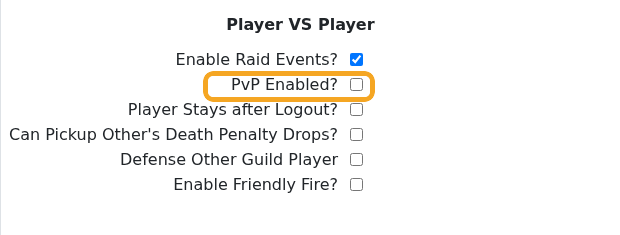
- Review nearby options such as death penalty drops, friendly fire, and guild damage rules.
- Click Save & Exit, then restart the server.
To turn PvP off later, untick PvP Enabled?, save, and restart again. Take a backup before changing combat rules on an active world: How to Backup your Palworld Server.
After changing the setting
Restart the server and test the setting from the game client. Ask another player to test as well if the change affects joining, permissions, PvP, crossplay, or admin access.
If it does not apply
Confirm the value was saved in the correct configuration file or panel field. Some games only read these settings during startup, so a full restart is required before the change is visible.
