The Isle of Siptah map uses a different Conan Exiles command line. On the LogicServers TCAdmin setup it is available from the command-line manager as an Isle of Siptah option.
- Open your Conan Exiles server in the control panel.
- Stop the server.
- Open Commandline Manager. If you want to keep a separate startup profile, see How to create a custom command line for your Conan Exiles server.
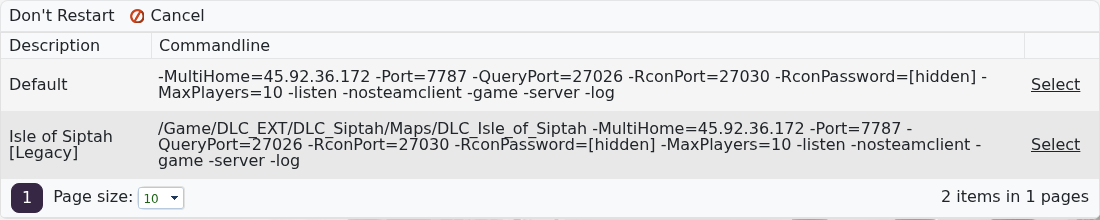
- Click Don't Restart if you want to change the selected command line without TCAdmin restarting the server immediately.
- Click Select on the Isle of Siptah command line.

- Start the server, or restart it if it is already running.
- Join the server and confirm it loads the Isle of Siptah map.
Before switching maps
- Back up the server before selecting the Isle of Siptah command line.
- Tell players that the visible world will change after the restart.
- Use the default command line again if you want to return to the Exiled Lands.
Switching maps changes the world loaded by the server. Back up the server before changing command lines, and switch back to the default command line if you want to return to the Exiled Lands.
