A custom command line gives your Conan Exiles server a separate startup profile. You can use one to choose the map and set startup values without replacing the predefined command lines.
Normal gameplay settings such as harvest rates, stamina and clan size belong in ServerSettings.ini. Use a custom command line for the startup options shown in Commandline Manager.
Create the custom command line
- Open your Conan Exiles server in the control panel.
- Back up the server first if you are changing maps.
- Open Commandline Manager.
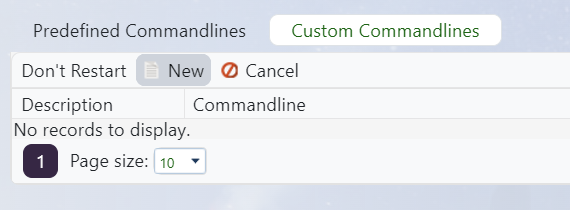
- Select the Custom Commandlines tab, then click New.
- Enter a clear name in Description, such as
Isle of SiptahorDefault map. - Set the RCon Password, Max Backups, and Map values required for this profile.
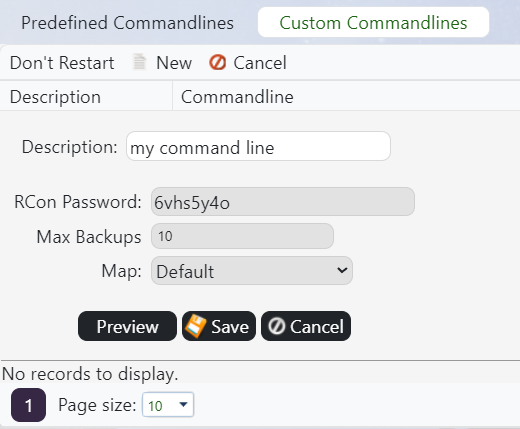
- Click Preview if you want to check the generated command line, then click Save.
- Find the new row and click Select. The active row changes to Selected.
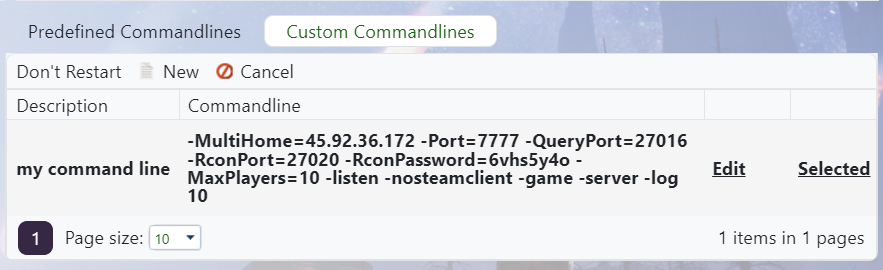
- If you clicked Don't Restart before selecting the row, restart the server manually. Otherwise, TCAdmin restarts it when the command line is selected.
- Open Web Console and check that the server starts without command-line errors, then join and confirm the expected map loads.
Available fields
| Field | What it controls |
|---|---|
| Description | The name shown for this profile in Commandline Manager. |
| RCon Password | The password used by RCon tools. Use a strong password and do not share it publicly. |
| Max Backups | The maximum number of automatic save backups retained by the Conan server. |
| Map | The Conan Exiles map loaded when the server starts. |
Change or remove a custom command line
Return to the Custom Commandlines tab and click Edit beside the profile. To stop using it, select another custom or predefined command line and restart the server.
If you are creating a profile for Siptah, also read How to use the Isle of Siptah map on a Conan Exiles server before switching worlds.
Troubleshooting
- If the old settings are still active, return to Commandline Manager and confirm the new row says Selected.
- If the server will not start, select the previous working command line and check the first error in Web Console.
- If the option you need is not available on the form, submit a support ticket with the exact startup option you want to add.
