How to set the owner of your Astroneer server

The Astroneer server owner can manage the dedicated server from inside the game. Set OwnerName to the intended owner's Steam name before they connect.

  1. Open your Astroneer server in the control panel and stop it.
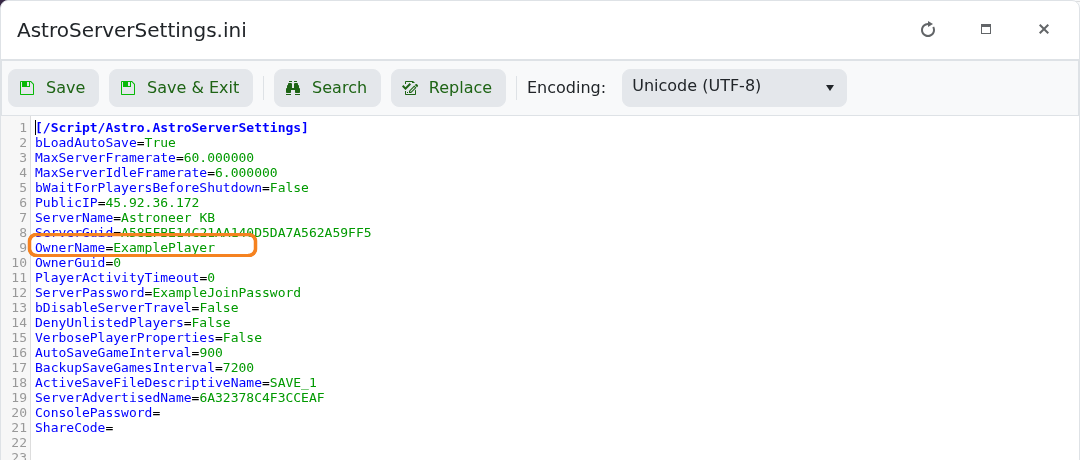
  2. Click Configuration Files, then open AstroServerSettings.ini with Text Editor.
  3. Set OwnerName=ExamplePlayer, replacing the example with the player's exact Steam name, and set OwnerGuid=0.

    Astroneer OwnerName setting highlighted in AstroServerSettings.ini

  4. Click Save & Exit and start the server.
  5. Ask that player to connect. Astroneer should replace OwnerGuid=0 with their unique owner GUID.

If ownership is not assigned, stop the server and check that OwnerName matches the Steam name exactly. Do not copy another player's generated owner GUID.

  • 0 Users Found This Useful
Was this answer helpful?

Related Articles

Configuring your Astroneer server

Astroneer keeps its hosted server settings in AstroServerSettings.ini. Always stop the server...

Connecting to your Astroneer server

Add an Astroneer dedicated server from the game's Dedicated Servers menu using the connection...

How to change your Astroneer server name

Set a clear Astroneer server name so you and other players can recognise it in the Dedicated...

How to set or remove a password on your Astroneer server

An Astroneer join password keeps the server private. It is separate from the console password and...

How to change Astroneer autosave and save-backup intervals

Astroneer's automatic save and save-backup intervals are measured in seconds. The current...