Dragonwilds no longer uses an admin password. To grant yourself owner access, follow the updated guide: How to become owner on your Dragonwilds server.
The Dragonwilds admin password is separate from the normal join password.
Set The Admin Password
- Open your Dragonwilds server in the control panel, then click Configuration Files on the left side menu.
- Open DedicatedServer.ini with Config Editor.
- Find Admin Password and enter a strong admin password.
Do not use the same value for Server Password and Admin Password.
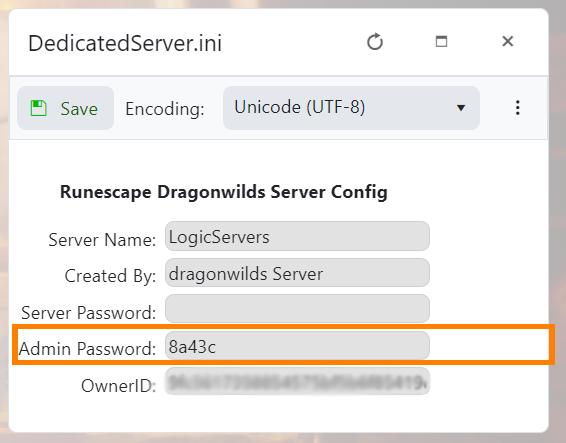
- Click Save & Exit, then restart the server so the new admin password is used.
If you also need owner access, use this guide next: How to become owner on your Dragonwilds server.
Password tips
Use a password you can safely share with your players and avoid reusing account passwords. After saving the change, restart the server and test joining before sending the new password out.
If the password does not apply
Check that the value saved correctly in the configuration editor, then restart the server again. If players can still join without a password, submit a support ticket with the server name and the setting you changed.
