Automatic updates are best for unmodded Dragonwilds servers that you want to keep current without running Steam Update manually.
If your server uses mods, update it manually instead. Automatic updates can install a new Dragonwilds version before your mods are ready for it, which can stop the server from starting or break mod features until the mods are updated. For a modded server, use the manual update guide instead: How to update your Dragonwilds server.
Before enabling automatic updates, take a backup first: How to backup your Dragonwilds Server.
Create A Steam Update Task
- Open your Dragonwilds server in the control panel, then click Scheduled Tasks on the left side menu.
- Click New, set Task Type to Steam Update, then click [ New ].

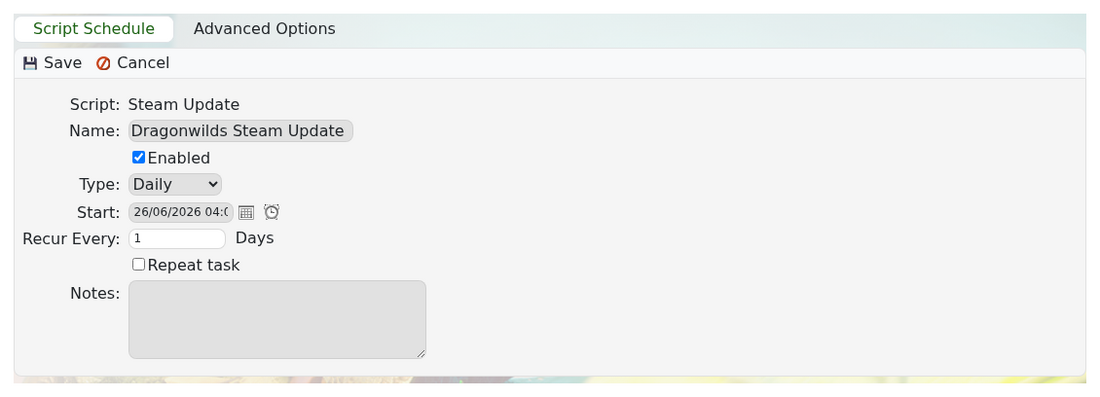
- Enter a clear name, such as Dragonwilds Steam Update.
- Make sure Enabled is checked.
- Set Type to Daily, choose a quiet start time, and set Recur Every to 1 day.
- Leave Repeat task unchecked. That option is for running the task again within the same day.
Set The Advanced Options
- Open the Advanced Options tab.
- Under If Players are Connected, choose Wait until empty or Skip execution. Do not use Force execution unless you are happy for the update to interrupt active players.
- Leave Update only if new version is available checked.
- Click Save.

