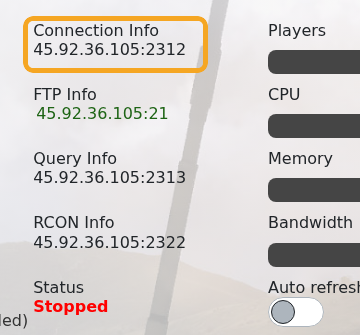
You can join your Arma 3 server by using the connection address from your control panel. Arma 3 servers normally use the game port shown in Connection Info, for example 45.92.36.105:2312.
- Open your Arma 3 server in the control panel.
- Copy the address under Connection Info.
- Open Arma 3 on your PC.
- Open the multiplayer server browser.
- Search for your server name, or use direct connect with the IP and port from the panel.
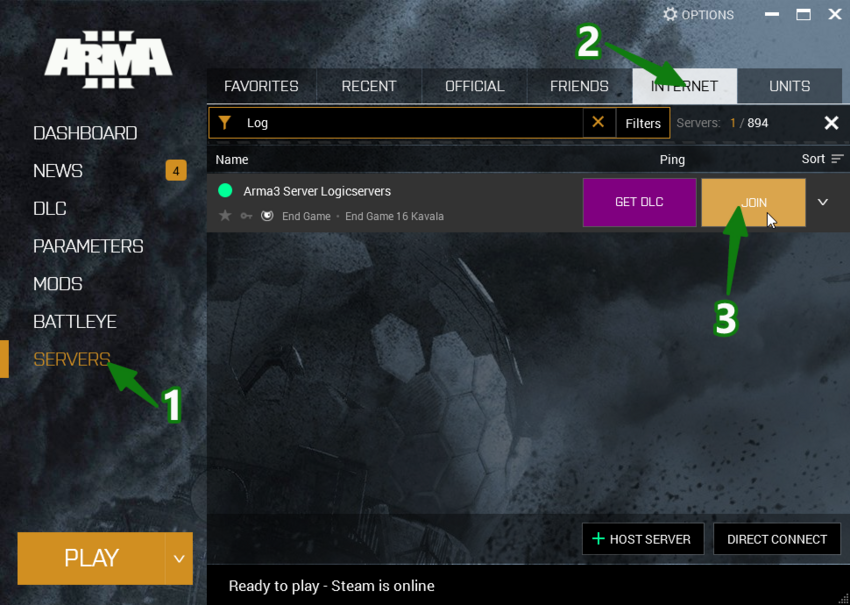
- Enter the server password if one is configured, then join.
If the server uses mods, make sure your client has the same required mods enabled before joining. If the server browser does not show every mod, check ARMA3 Server mods not showing on game launcher.
If the server does not appear
Confirm the server is online in the control panel, then refresh the in-game browser. Server lists can take a few minutes to update after a restart. If direct connect is available, use the server IP and port from the control panel.
Connection checks
Make sure your game client is on the same branch or version as the server. Mods, passwords, and whitelist settings can also prevent a successful connection.
