The Arma 3 server name and join password are stored in server.cfg. The easiest way to change them is through the Config Editor, then restart the server so the new values are loaded.
- Open your Arma 3 server in the control panel.
- Click Configuration Files.
- Find
server.cfg, then click Config Editor.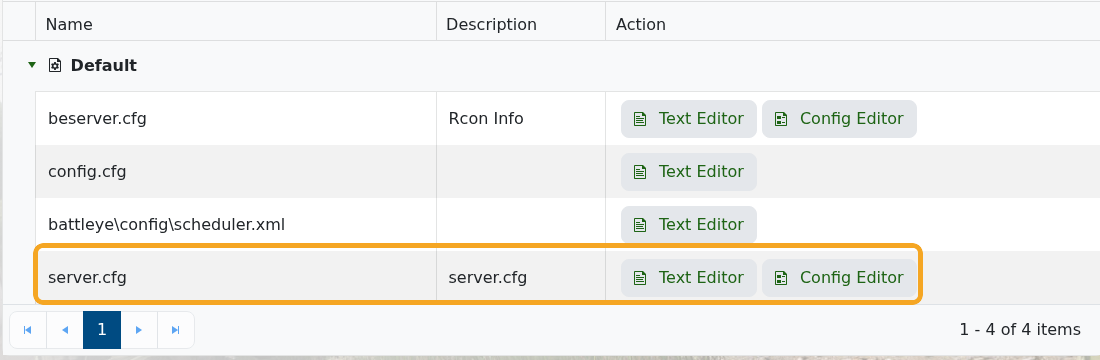
- Change Server Name and Server Password as needed.
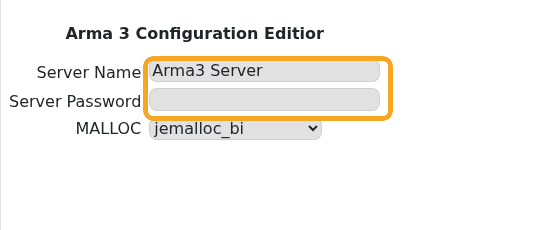
- Click Save & Exit.
- Restart the server.
Leave the server password blank if you want the server to be public. Use a password when you want a private training, unit, or event server where only invited players can join. If players still see the old name in the browser after a restart, wait a few minutes and refresh the server list.
Password tips
Use a password you can safely share with your players and avoid reusing account passwords. After saving the change, restart the server and test joining before sending the new password out.
If the password does not apply
Check that the value saved correctly in the configuration editor, then restart the server again. If players can still join without a password, submit a support ticket with the server name and the setting you changed.
