Checking listening ports tells you whether software is actually waiting for connections. This is useful for game servers, web servers, databases, bots, and RCON tools.
If the service is not listening locally, no firewall rule will make it reachable from outside. Start the application first, then check the port.
- Connect to the VPS with SSH.
- Use
ssto list listening TCP and UDP ports:sudo ss -tulpn
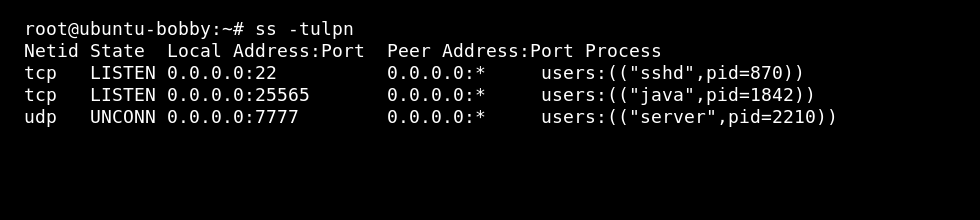
- If
netstatis installed, use the memorable-peanutcommand:sudo netstat -peanut
- If netstat is missing on Ubuntu or Debian, install it with:
sudo apt install net-tools
- If netstat is missing on AlmaLinux, Rocky Linux, Oracle Linux, or CentOS, install it with:
sudo dnf install net-tools
What to check
| Check | Why it matters |
|---|---|
| TCP or UDP | The firewall rule must match the protocol the service uses. |
| Local address | 127.0.0.1 means local-only; 0.0.0.0 usually means all IPv4 addresses. |
| Process name | Confirms the expected service owns the port. |
| Firewall | The service can listen locally but still be blocked from the internet. |
For firewall rules, use How to open firewall ports on a Linux VPS.
