UE4SS is required by many RuneScape: Dragonwilds mods. The easiest way to install it is through Mod Manager, but you can also upload UE4SS manually if you have the correct server files from the mod author or the UE4SS GitHub release page.
Before changing mod files, take a backup first: How to backup your Dragonwilds Server. If you are updating a modded server, use the manual update guide rather than automatic updates, as game updates can break mods until they are updated: How to update your Dragonwilds server.
Install Or Update UE4SS From Mod Manager
- Open your Dragonwilds server in the control panel, then click Mod Manager.
- Find UE4SS for RSDragonwilds, then click Install. If UE4SS is already installed, click Update if shown, or click Install again to reinstall the panel version.
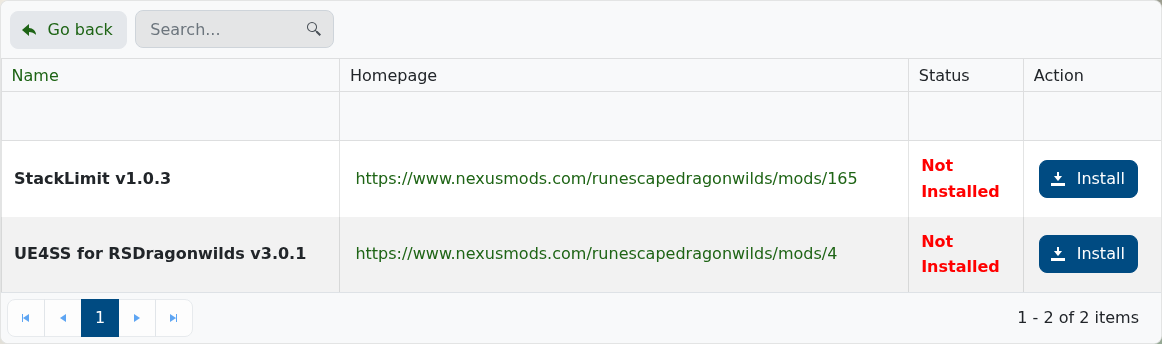
- Wait for the install task to finish, then restart the server once so the UE4SS folders are created.
Install UE4SS Manually
Use this method if the panel version is not suitable for the mod you are installing, or if the mod author asks you to use a specific UE4SS build.
- Download the UE4SS files required by the mod. This may be from the mod author, Nexus Mods, GitHub, or the UE4SS GitHub releases page.
- Open File Manager, or connect with FileZilla if you are uploading a larger archive: How to connect to SFTP using FileZilla.
- Open
RSDragonwilds/Binaries/Win64, then upload and extract the UE4SS files there. The UE4SS DLL file should sit in the same folder as the Dragonwilds server executable. - Restart the server once. If UE4SS loaded correctly, it should create or use the
ue4ssfolder insideRSDragonwilds/Binaries/Win64.
Installing mods & Updating
To update UE4SS, install it again from Mod Manager or replace the manual UE4SS files with the newer version.
After UE4SS is installed, use the main Dragonwilds mods guide to upload or update UE4SS mods: Installing and updating mods on your Dragonwilds Server.
