Restore an Empyrion backup when you need to roll the server back after a bad update, unwanted save change, broken scenario install, or accidental file edit. Restoring replaces current server files with the selected backup, so take a new backup first if you may need the current state later.

Restore A Backup

  1. Open your Empyrion server in the control panel.
  2. Stop the server.
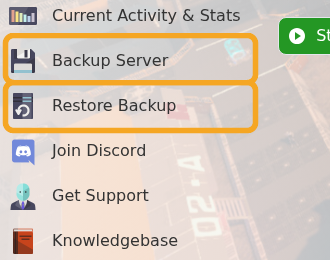
  3. Click Restore Backup.

    Empyrion control panel showing Restore Backup

  4. Select the backup file you want to restore.
  5. Tick Are you sure?.
  6. Click Execute.

    Empyrion Restore Backup form

  7. Wait for the restore task to finish, then start the server.

If the server will not start after a restore, open Log Viewer and check DedicatedServer.txt. If you are unsure which backup to restore, submit a support ticket before overwriting the current files.

  • 16 Users Found This Useful
Was this answer helpful?

Related Articles

Using your own game save in Empyrion

You can upload an existing Empyrion save by placing the save folder inside Saves/Games and then...

How to delete a players data in Empyrion

Delete Empyrion player data when you need to reset one player without wiping the whole world....

How to backup your Empyrion server save

Create an Empyrion backup before updating, restoring files, changing scenarios, uploading saves,...

How to create a custom admin file for your Empyrion server

Empyrion admin permissions are controlled in adminconfig.yaml. Add a player SteamID64 under...

How to add Reforged Eden II to Empyrion server

Reforged Eden II is the current Reforged Eden scenario path for Empyrion servers. It is...