如何向您的 Blackwake 服务器添加管理员

列印
  • 0

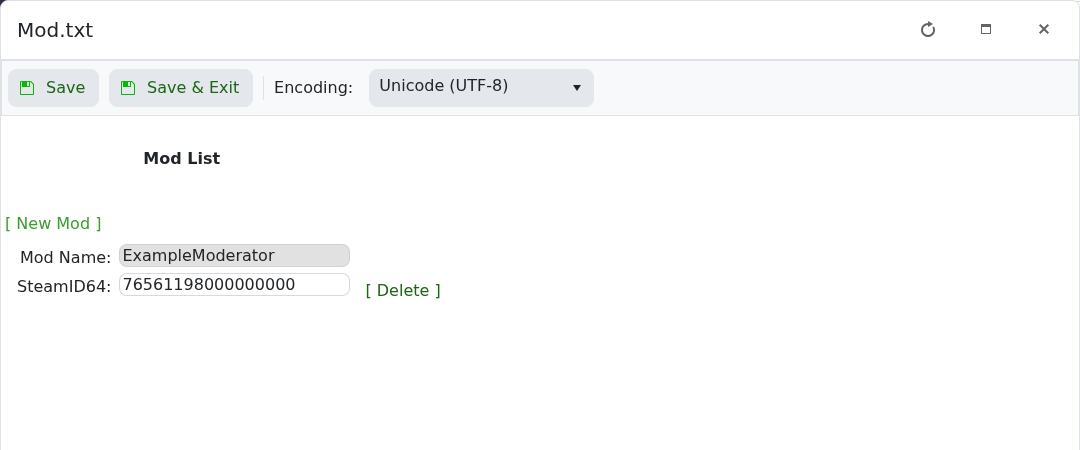
Blackwake 将管理员存储在 Mod.txt 中。Config Editor 通过显示名称和玩家的 17 位 SteamID64 添加每位管理员。

  1. 打开 Blackwake 服务并停止它。
  2. 点击 Configuration Files,然后点击位于 Mod.txt 旁边的 Config Editor
  3. 点击 New Mod,输入一个易于识别的名称和玩家的 SteamID64。

    Blackwake Mod.txt Config Editor,包含管理员名称和 SteamID64 字段

  4. 对其他管理员重复此步骤,然后点击 Save & Exit
  5. 启动服务器并让该玩家重新连接。

使用位于条目旁边的 Delete 来删除该管理员。如果权限未生效,请检查 SteamID64 的每一位数字并再次重启服务器。


這篇文章有幫助嗎?

相關文章

« 返回

Follow us on Social Media

Stay in the loop! Follow our social media accounts and stay up-to-date with the latest news, announcements, tips & tricks and behind-the-scenes insights!