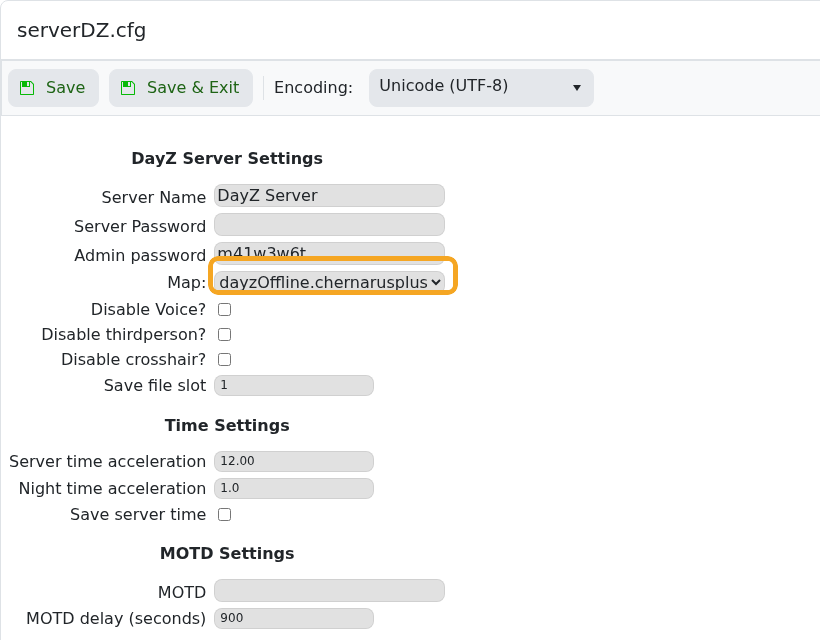
To change the map of your DayZ Standalone server to Livonia from Chernarus follow these steps:

  • Find your serverDZ.cfg file in your "Configuration Files", "File Manager" or by using a FTP client such as Filezilla
  • Edit the file and scroll down to where it says:
template="dayzOffline.chernarusplus"; // Mission to load on server startup. 
  • Change the line to:
template="dayzOffline.enoch";
  • Start the server and your server should now be on Livonia. Before joining make sure that you have the DLC installed for DayZ Livonia.


  • Livonia, Enoch, Map, DayZ
  • 22 brukere syntes dette svaret var til hjelp
Var dette svaret til hjelp?

Relaterte artikler

How to install the workshop map Namalsk Survival on your DayZ: Standalone Server

Step 1 Click on Steam Workshop Search Namalsk Survival Click install Search Namalsk Island...

How to disable idle on loot when no one is online on your DayZ Game Server

To disable the server idle on loot feature in DayZ when no one is online, you can follow these...

How install DZSA Launcher on your DayZ server

The DZSA Launcher (also known as DZSALauncher or DZSAL) is a crucial tool for enhancing the DayZ...

How to update your DayZ server to the latest version

Keeping your DayZ server updated is crucial for a smooth, engaging gaming experience, especially...