
How to Increase Engram Points Per Level
Engram points in Ark can be earned by levelling up your survivor and are used to unlock blueprints to craft items and structures. Very often a server owner may want to increase the amount of Engram points a player earns each level.
1. Login to your TCAdmin control panel:
When you purchased your Ark Survival Evolved server with us you will have been sent your login details via email. Use those details to login to your TCAdmin control panel. When you are logged into your panel you will see various options available to you. From here you can control your server. If you do not have a server with us you can get one here - https://logicservers.com/game-servers/ark-survival-evolved
2. Stop your server:
Before making any changes to your server press the stop button on your TC Admin control panel. This can be found underneath your server's connection details in the top left hand side. Pressing Stop will shutdown your server ready for you to make any changes.
3. Backup your server files:
It is always good practice to make a backup of your server before you make any changes or update your server. This will give you the option to restore back if you make any mistakes or anything goes wrong. To backup your server press the ‘Backup Server’ button on your panel. The buttons icon represents a disk.
4. Open your configuration files:
Press the ‘Configuration Files’ button on your panel. This will open the Configuration Files page.

5. Edit your Game.ini configuration file:
Press the ‘Text Editor’ button on your Game.ini config.

6. Add your config changes:
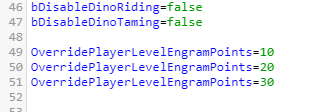
Navigate to the bottom of the Game.ini and add the following..
As in the above example you need to add a line for each level. In this example all players on the server will get 10 engram points at level 1, 20 at level 2 and 30 at level 3. You can add as many lines like this for each level and change the points to how you want them.
Refer to the Wiki page here to see how many engram points you gain per level in the vanilla version of the game..
https://ark.wiki.gg/wiki/Experience
7. Save your config changes:
Once you are done editing your config and you are happy with the changes press the ‘Save and Exit’ button.
8. Start your server:
Press the ‘Go back’ button to head back to your panel's main page and then click ‘Start’ so your server starts back up with the new engram point changes.
Your server has now been updated with the new engram point changes. Please note that in order to see the point change on your server your character may need to drink a ‘Mindwipe potion’. This will allow you to redistribute all your engram points.



