
ARK Aquatica has just been released, but there is an issue regarding no mods working on the new version. Due to this, if you want to use another map or mods with your ARK Survival Evolved Server Hosting, you'll have to revert back to the "Pre-Aquatica" branch on Steam for ARK: Survival Evolved. This is a really quick and easy process to do, and you'll be back playing the mods you love in no time.
Reverting your ARK Server
- First, stop your server and run a backup (just incase you need it).
- Next, click on the Actions Tab / More button and click on Install Pre-Aquatica Branch.
- Wait for it to finish, once done, start up your server!
Reverting your ARK game on Steam
- First, go to your steam library.
- Right click on ARK: Survival Evolved and select properties.
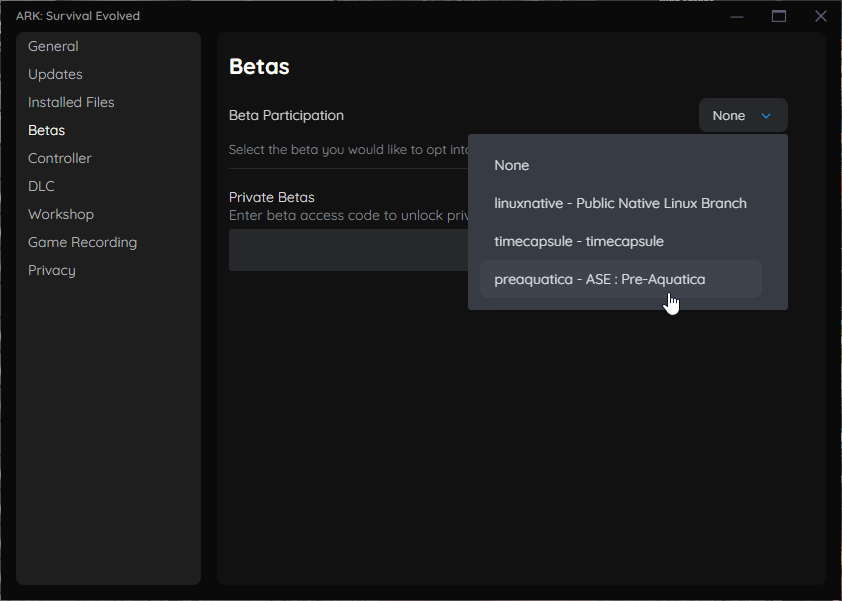
- On the window that pops up, click on the BETA tab and then in the dropdown box select preaquatica. You can then close the window.
- Wait for steam to download the files for the branch.
- Once downloaded, open up the game and enjoy your server!
That's it, you've successfully reverted back to the Pre-Aquatica branch, if you have any issues while doing this, please do submit a ticket to the team and we'll help you out.
With some luck, we will see an Aquatica update that will allow mods to be ran with the DLC, but we'll have to wait and find out.


