The ARK admin password is used with enablecheats so admins can run commands from the in-game console. Change it if it has been shared too widely or if staff access changes.

  1. Open your ARK server in the control panel.
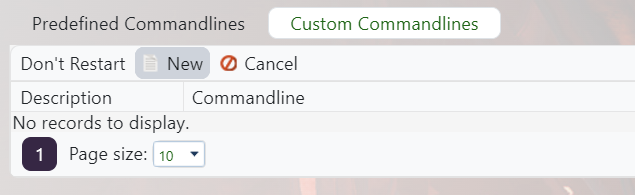
  2. Click Commandline Manager.

    ARK control panel custom command line button and new command line flow

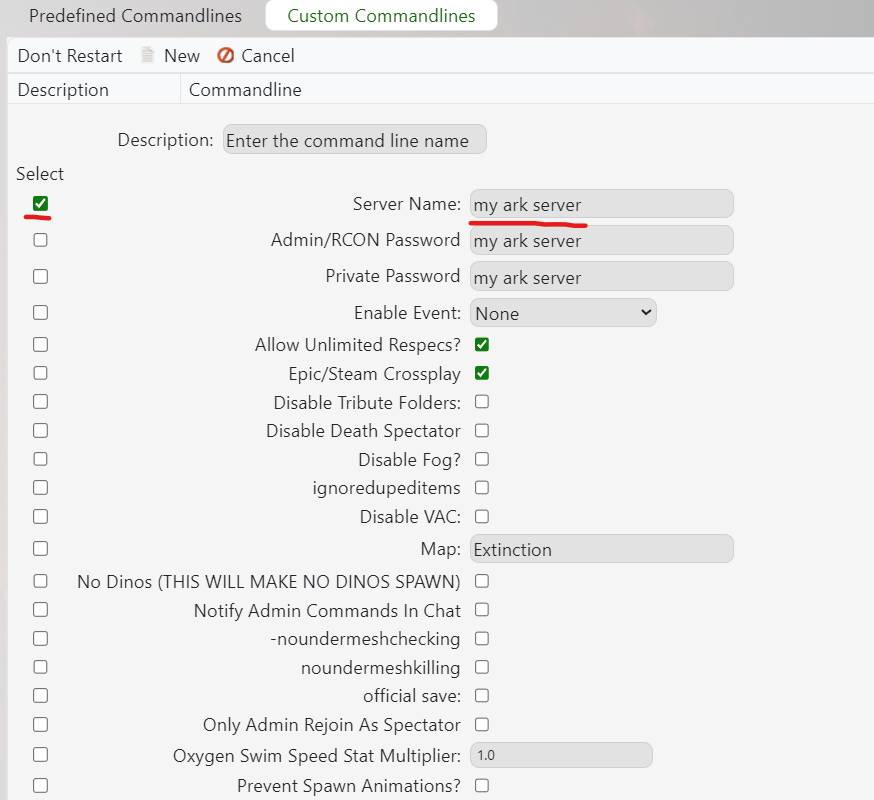
  3. Edit the selected command line, or create a custom command line if needed: Creating a custom command line on your ARK server.
  4. Set Server Admin Password / ServerAdminPassword to the new password.

    ARK custom command line options screen

  5. Save the command line, select it if needed, then restart the server.
  6. Join the server and test the password with:
    enablecheats NEWPASSWORD

For permanent admin access without sharing the password, add staff SteamID64 values to AllowedCheaterSteamIDs.txt: Using admin commands, and whitelisting admins on your ARK server.


  • Change, server, admin password
  • 97 Корисниците го најдоа ова како корисно
Дали Ви помогна овој одговор?

Понудени резултати

Updating to the latest ARK patch

Use Steam Update when ARK releases a server update. Take a backup first if you are also changing...

How to run ARK ScorchedEarth DLC on your server

Scorched Earth is selected from the ARK server command line/startup options. Changing map...

ARK cross-server gateway travel using multiple servers in a cluster

Note: for servers purchased before 16/09/2016 (16th September 2016) please send in a support...

How to disable Battleye on an ARK server

BattlEye can be disabled from the ARK server startup options when you need to troubleshoot...

How to upload a single player world onto your ARK server

You can upload an ARK single-player save by copying the local save files from your PC into the...