
The new ARK: Survival Evolved DLC is now available, it's an exciting underwater update to celebrate 10 years of ARK.

To run this on your server, you'll need to create a custom command line - which we have a guide for here: Creating a custom command line on your ARK server


When creating your custom command line using the article above, please use the map name Aquatica when setting the command line, this will activate the new ARK Aquatica DLC on your ARK Server Hosting.

Click save on the command line once you have put the map name in, then click save and finally select on the right hand side and start up your server! Enjoy the new DLC!
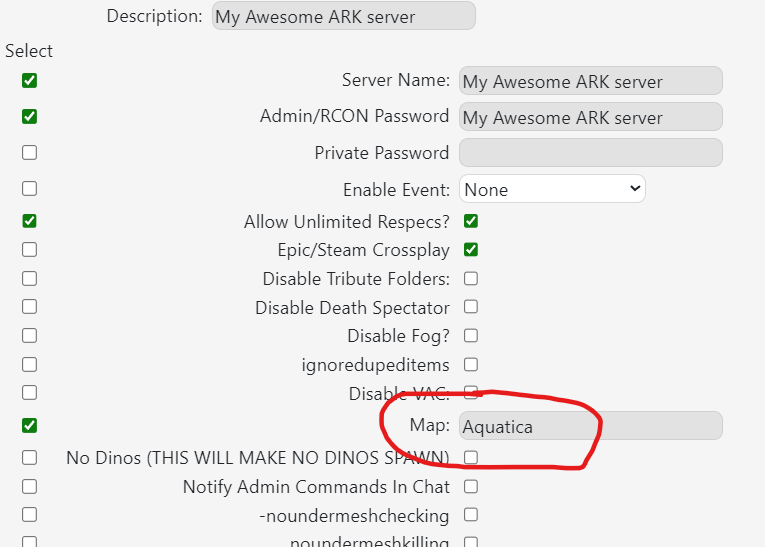
 
 
enable aquatica
  • 0 brukere syntes dette svaret var til hjelp
Var dette svaret til hjelp?

Relaterte artikler

Updating to the latest ARK patch

Use Steam Update when ARK releases a server update. Take a backup first if you are also changing...

How to run ARK ScorchedEarth DLC on your server

Scorched Earth changes the server into ARK's desert-focused DLC map, with heat, storms,...

ARK cross-server gateway travel using multiple servers in a cluster

Note: for servers purchased before 16/09/2016 (16th September 2016) please send in a support...

How to disable Battleye on an ARK server

BattlEye can be disabled from the ARK server startup options when you need to troubleshoot...

How to upload a single player world onto your ARK server

You can upload an ARK single-player save by copying the local save files from your PC into the...


