DayZ Frostline uses the official Sakhal map. On the server, the mission folder is dayzOffline.sakhal. Switch to it from serverDZ.cfg, then restart the server. Players need the Frostline DLC to join a Sakhal server.

  1. Open your DayZ server in the control panel.
  2. Click Backup Server before changing maps.
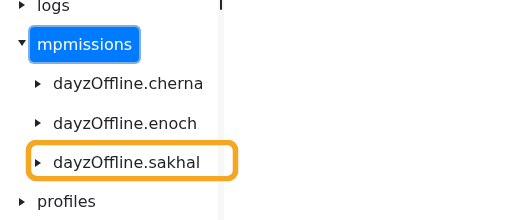
  3. Click File Manager, then open mpmissions and confirm dayzOffline.sakhal exists.

    DayZ File Manager showing dayzOffline.sakhal in mpmissions

  4. If dayzOffline.sakhal is missing, run Steam Update first, then check mpmissions again.
  5. Click Configuration Files.
  6. Open serverDZ.cfg with Config Editor.
  7. Change Map to the Sakhal/Frostline option if it appears in the dropdown.
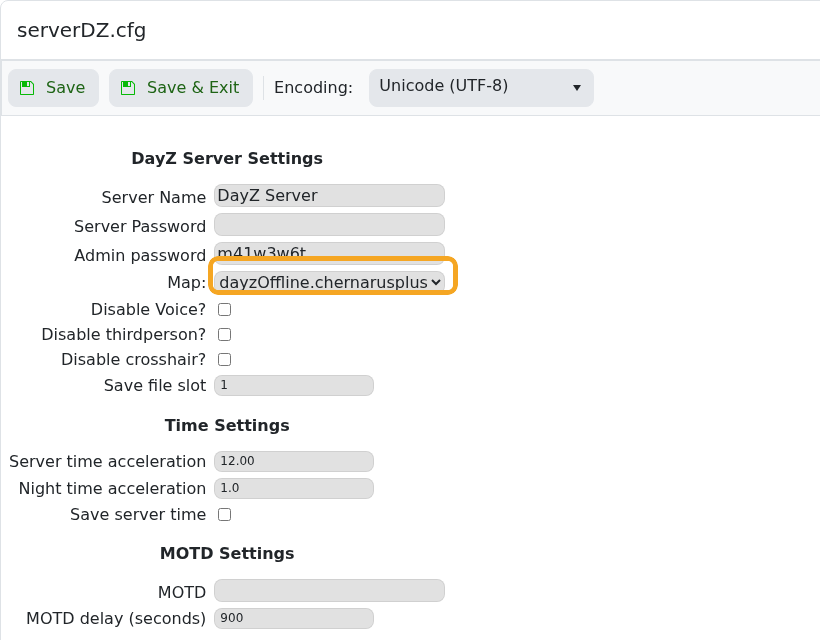
    DayZ serverDZ.cfg Config Editor showing map dropdown

  8. If the dropdown does not show Sakhal, open serverDZ.cfg with Text Editor and set the mission template to dayzOffline.sakhal.
  9. Click Save & Exit, then restart the server.

Changing to Sakhal is a map change, so do not switch a live Chernarus or Livonia save without a backup. If players cannot join, confirm they own Frostline and that the server has restarted onto dayzOffline.sakhal.


  • 0 کاربر این را مفید یافتند
آیا این پاسخ به شما کمک کرد؟

مقالات مربوطه

Changing the map to Livonia on your DayZ:Standalone Server

DayZ map selection is controlled from serverDZ.cfg. Use the Config Editor map dropdown when...

Admin commands for your DayZ: Standalone Server

DayZ does not have a normal in-game owner console like some survival games. Server administration...

How to install the workshop map Namalsk Survival on your DayZ: Standalone Server

Namalsk requires the official Namalsk Island terrain Workshop item and the official Namalsk...

How to disable idle on loot when no one is online on your DayZ Game Server

DayZ idle mode settings are stored in the active mission database file globals.xml. Change these...

How install DZSA Launcher on your DayZ server

DZSA Launcher support is added with the server-side DZSA/DZSAL package, usually named...