Create an Empyrion backup before updating, restoring files, changing scenarios, uploading saves, or editing important YAML files. Backups give you a restore point if a world, scenario, or configuration change does not work as expected.

Create A Backup

  1. Open your Empyrion server in the control panel.
  2. For the cleanest backup, stop the server first. This is recommended before major updates or scenario changes.
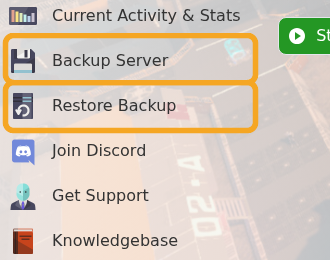
  3. Click Backup Server.

    Empyrion control panel showing Backup Server and Restore Backup

  4. Wait for the backup task to finish before making changes.
  5. Start the server again if you stopped it.

For routine small edits you can usually keep the server online, but stopping first reduces the chance of files changing while the backup is being created.


  • 18 Utenti hanno trovato utile questa risposta
Hai trovato utile questa risposta?

Articoli Correlati

Using your own game save in Empyrion

You can upload an existing Empyrion save by placing the save folder inside Saves/Games and then...

How to delete a players data in Empyrion

Delete Empyrion player data when you need to reset one player without wiping the whole world....

How to restore a backup for your Empyrion server

Restore an Empyrion backup when you need to roll the server back after a bad update, unwanted...

How to create a custom admin file for your Empyrion server

Empyrion admin permissions are controlled in adminconfig.yaml. Add a player SteamID64 under...

How to add Reforged Eden II to Empyrion server

Reforged Eden II is the current Reforged Eden scenario path for Empyrion servers. It is...