ARK API is a plugin framework for ARK servers. It is normally installed from Mod Manager on supported Windows ARK services. If your service is not on Windows or the installer is not available, submit a ticket before attempting a manual install.

  1. Back up the server first: Backing up and restoring world and player data on your ARK server.
  2. Open your ARK server in the control panel.
  3. Click Mod Manager.

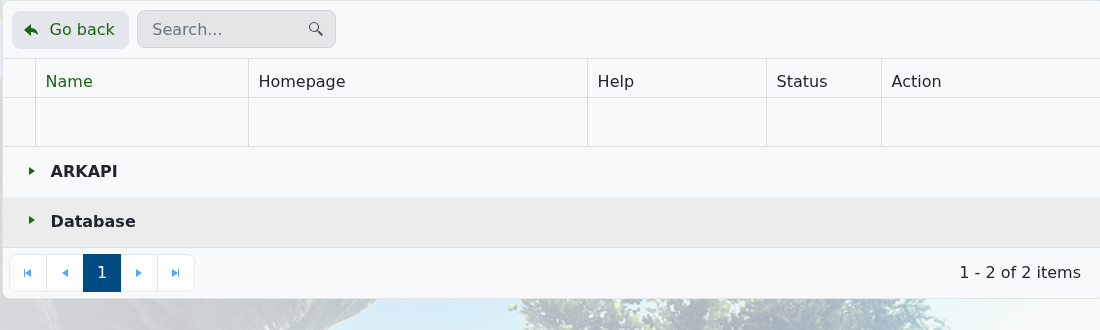
    ARK Mod Manager showing ARKAPI group

  4. Expand ARKAPI if the entry is collapsed.
  5. Install the ARK API option shown in Mod Manager.
  6. Restart the server and check the log for ARK API load messages.

Run a Steam Update before reinstalling ARK API after major ARK updates if plugins stop loading. Use How to install ARK API Plugins on an ARK Server after ARK API is installed.


  • 0 Користувачі, які знайшли це корисним
Ця відповідь Вам допомогла?

Схожі статті

Updating to the latest ARK patch

Use Steam Update when ARK releases a server update. Take a backup first if you are also changing...

How to run ARK ScorchedEarth DLC on your server

Scorched Earth changes the server into ARK's desert-focused DLC map, with heat, storms,...

ARK cross-server gateway travel using multiple servers in a cluster

Note: for servers purchased before 16/09/2016 (16th September 2016) please send in a support...

How to disable Battleye on an ARK server

BattlEye can be disabled from the ARK server startup options when you need to troubleshoot...

How to upload a single player world onto your ARK server

You can upload an ARK single-player save by copying the local save files from your PC into the...