Minecraft worlds, player inventories, plugin data, and modpack files can change while the server is running. Stop the server before taking a backup if you are about to update, install plugins, change modpacks, edit worlds, or reset player data.

Back up the Minecraft files

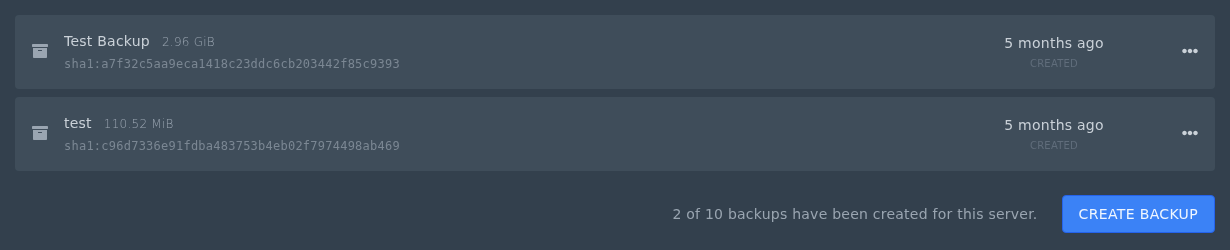
  1. Open your Minecraft server in the Ptero control panel, then open Backups.
  2. Click Create Backup.

    Backups page for a Minecraft server on Ptero

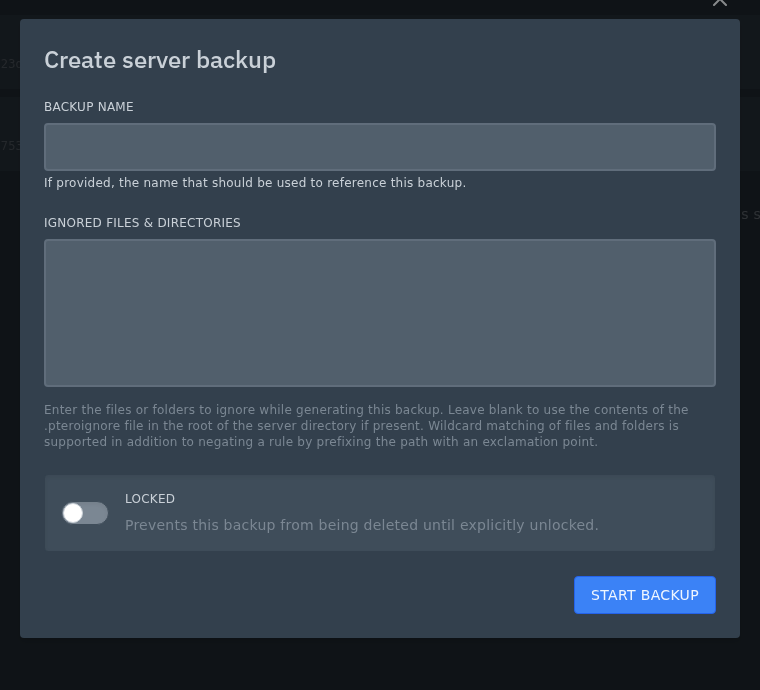
  3. Enter a name that explains why you are taking it, such as Before plugin update, Before new modpack, or Before world reset.
  4. Leave Ignored Files & Directories blank for a normal Minecraft backup. Only add exclusions if you are sure a file or folder does not need saving.
  5. Use Locked for backups you do not want deleted by accident, such as a backup before a major version or modpack change.
  6. Click Start Backup.

    Create backup form for a Minecraft server

Wait until the backup has completed before starting the server or changing files. Modded servers and large worlds can take longer.


  • 0 utilizatori au considerat informația utilă
Răspunsul a fost util?

Articole similare

Colour Codes for Minecraft Multiplayer and Vanilla

This article lists all of the codes you can use with many plugins in Minecraft using Spigot or...

What is the difference between Fabric, Quilt and Forge in Minecraft Modding

Exploring the Distinctions Between Fabric and Forge When diving into the exciting world of...

What is a Grindstone and how is it used?

In this guide, we will teach you what the Grindstone in Minecraft does, and how to use it...

How to Convert Java and Bedrock Edition Worlds

In this guide, we’ll be teaching you how to convert your world from a Java Edition world to a...

Minecraft's New Version Numbers

Minecraft has changed how its version numbers work from 2026 onwards. Instead of carrying on with...