Wiping the world removes the current Minecraft map and lets the server generate a fresh one. Back up the server first if there is any chance you will need the old world again.

Reset the world

  1. Stop the server, then open Files in the control panel.
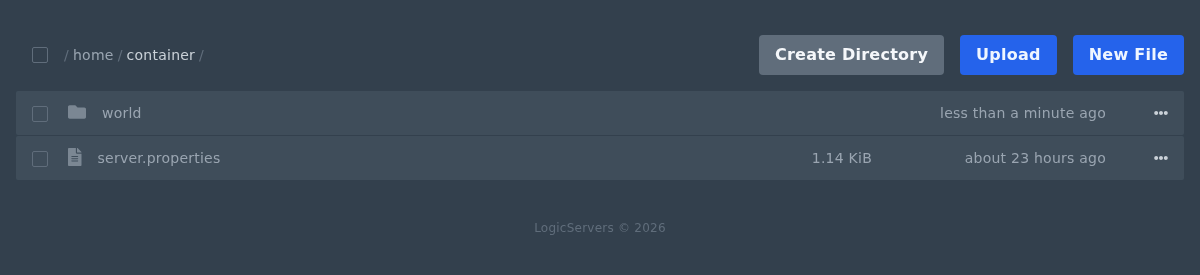
  2. Find the current world folder. The default Java folder is usually world. If you are not sure, open server.properties and check the level-name setting.

    Minecraft world folder in the Ptero file manager

  3. Open the menu for the world folder. Delete it if you want to wipe it fully, or rename it if you want to keep a copy on the server.
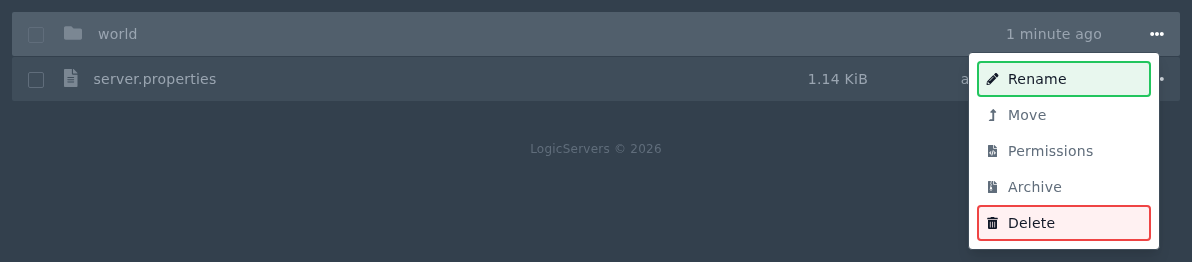
    Minecraft world folder menu showing Rename and Delete options

  4. If your server has separate Nether or End folders, such as world_nether and world_the_end, remove those too if you want a full reset.
  5. Start the server again. Minecraft will create a fresh world folder using the current server settings.

Modded servers may use different world folder names. Check server.properties or the modpack documentation if you are not sure.


  • 0 Utilizadores acharam útil
Esta resposta foi útil?

Artigos Relacionados

Colour Codes for Minecraft Multiplayer and Vanilla

This article lists all of the codes you can use with many plugins in Minecraft using Spigot or...

What is the difference between Fabric, Quilt and Forge in Minecraft Modding

Exploring the Distinctions Between Fabric and Forge When diving into the exciting world of...

What is a Grindstone and how is it used?

In this guide, we will teach you what the Grindstone in Minecraft does, and how to use it...

How to Convert Java and Bedrock Edition Worlds

In this guide, we’ll be teaching you how to convert your world from a Java Edition world to a...

Minecraft's New Version Numbers

Minecraft has changed how its version numbers work from 2026 onwards. Instead of carrying on with...