
Simple Voice Chat needs the mod or plugin installed and a UDP port for voice traffic. Players also need the matching client mod.

Install and configure voice chat

  1. Stop the server and take a backup.
  2. Install the Simple Voice Chat plugin or mod for your server type.
  3. Open Network and make sure you have an extra allocation for the voice chat port.
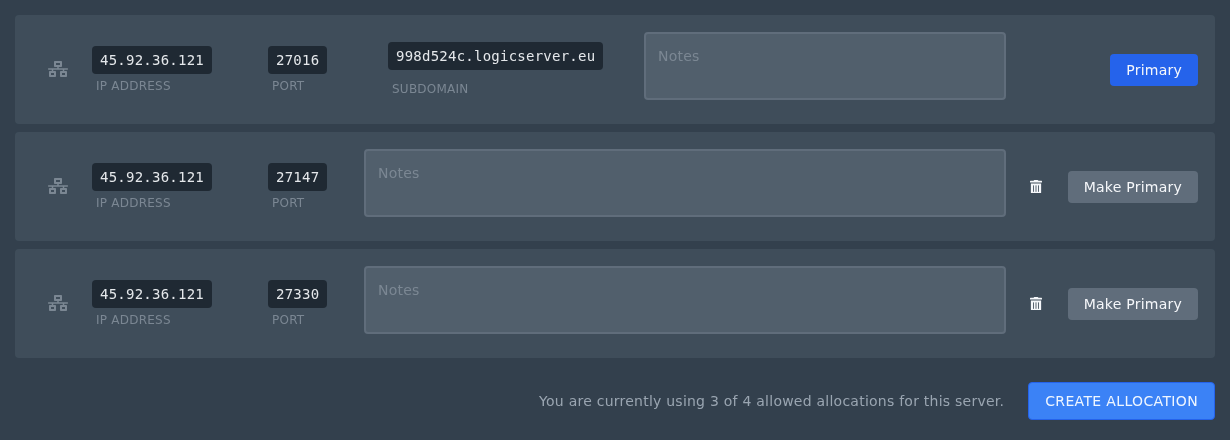
    Create Allocation button on the Ptero Network page

  4. Open the Simple Voice Chat config and set the port to the extra allocation port.
  5. Start the server and check Console for voice chat startup messages.

Do not use the main Minecraft port for voice chat. Use an extra allocation from the Network page.


  • 0 Пользователи нашли это полезным
Помог ли вам данный ответ?

Связанные статьи

Colour Codes for Minecraft Multiplayer and Vanilla

This article lists all of the codes you can use with many plugins in Minecraft using Spigot or...

What is the difference between Fabric, Quilt and Forge in Minecraft Modding

Exploring the Distinctions Between Fabric and Forge When diving into the exciting world of...

What is a Grindstone and how is it used?

In this guide, we will teach you what the Grindstone in Minecraft does, and how to use it...

How to Convert Java and Bedrock Edition Worlds

In this guide, we’ll be teaching you how to convert your world from a Java Edition world to a...

Minecraft's New Version Numbers

Minecraft has changed how its version numbers work from 2026 onwards. Instead of carrying on with...
