
Subusers let another person access your Minecraft server panel without giving them your own login. You can choose exactly what they are allowed to do.

Invite a subuser

  1. Open your Minecraft server in the control panel.
  2. Open Users from the left menu.
  3. Click New User.
  4. Enter the email address for the person you want to invite.
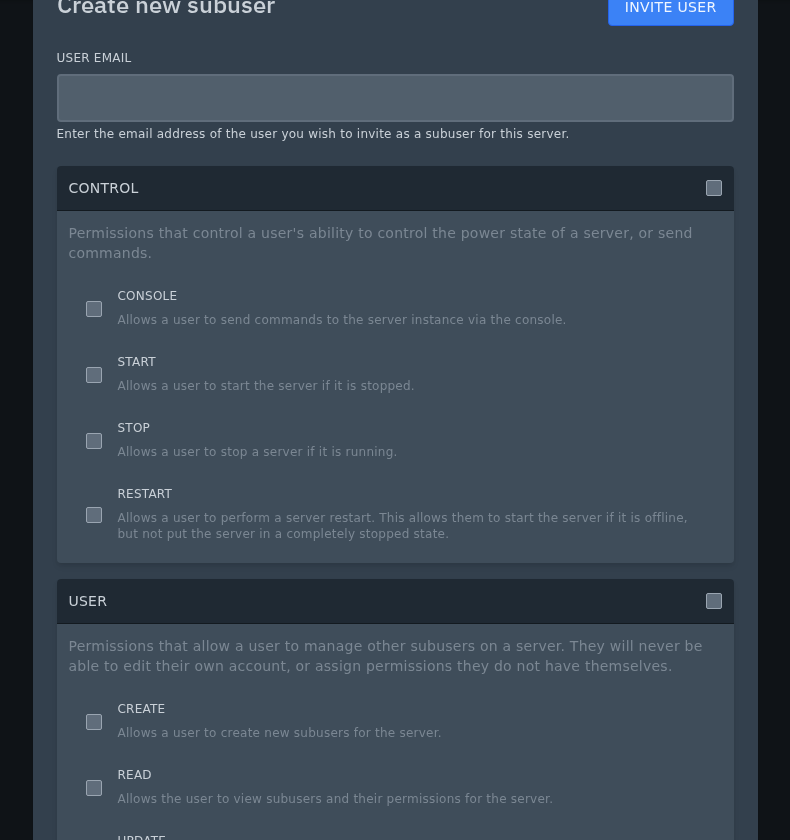
    New subuser invite window and permissions on Ptero

  5. Choose the permissions they should have, then send the invite.

Only give permissions the person actually needs. For example, someone helping with plugins may need File Manager and Console access, but they may not need permission to delete backups or change server settings.


  • 0 Kasutajad peavad seda kasulikuks
Kas see vastus oli kasulik?

Seotud artiklid

Colour Codes for Minecraft Multiplayer and Vanilla

This article lists all of the codes you can use with many plugins in Minecraft using Spigot or...

What is the difference between Fabric, Quilt and Forge in Minecraft Modding

Exploring the Distinctions Between Fabric and Forge When diving into the exciting world of...

What is a Grindstone and how is it used?

In this guide, we will teach you what the Grindstone in Minecraft does, and how to use it...

How to Convert Java and Bedrock Edition Worlds

In this guide, we’ll be teaching you how to convert your world from a Java Edition world to a...

Minecraft's New Version Numbers

Minecraft has changed how its version numbers work from 2026 onwards. Instead of carrying on with...
