
You can find your Dragonwilds server connection details on the server home page in the control panel.

Find your server address

  1. Open your Dragonwilds server in the control panel.
  2. Check the Connection Info box on the server home page.
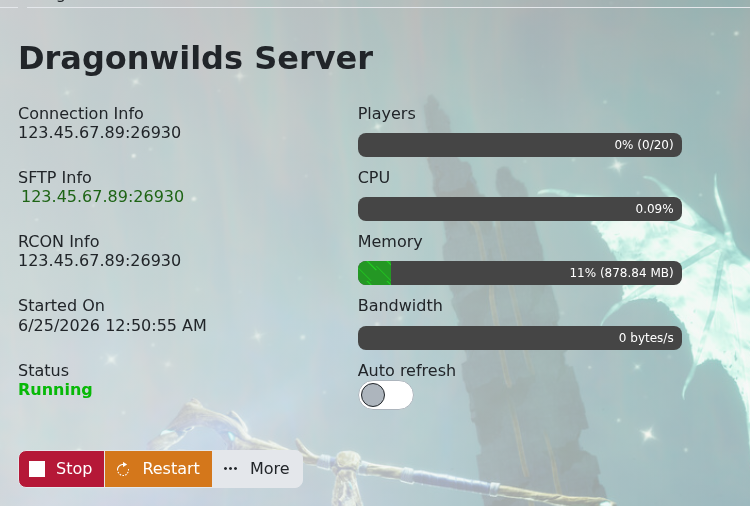
    Dragonwilds server connection information

  3. Copy the server IP and port shown there.

Join in-game

  1. Start Dragonwilds from Steam.
  2. Open the multiplayer or server join screen.
  3. Enter the server IP and port from the control panel.
  4. Enter the server password if your server has one set.

If the server does not appear in-game, make sure it is showing as running in the control panel first.


  • 0 utilizatori au considerat informația utilă
Răspunsul a fost util?

Articole similare

How to backup your Dragonwilds Server

Dragonwilds servers include scheduled backups, but it is still worth taking a manual backup...

How to restore your Dragonwilds Server from a backup

You can restore a Dragonwilds backup if a setting change, mod install, update, or world change...

How to Change Your Dragonwilds Username

Dragonwilds player names are handled by the game client rather than the server control panel. If...

Dragonwilds Server RAM Recommendations

The right RAM amount for a Dragonwilds server depends on player count, world activity, mods, and...

Installing mods on your Dragonwilds Server

Dragonwilds mods can be installed from the Mod Manager when we have added a supported mod there....
