
V Rising uses two main configuration files. ServerHostSettings.json controls the server name, password, save name, listing, autosave, and difficulty preset. ServerGameSettings.json controls the gameplay rules.
- Open your V Rising server in the control panel.
- Stop the server before making larger setting changes.
- Click Configuration Files.
- Use Config Editor next to
ServerHostSettings.jsonfor host settings such as Server Name, Server Password, Save Name, listing options, autosave, and wipe interval.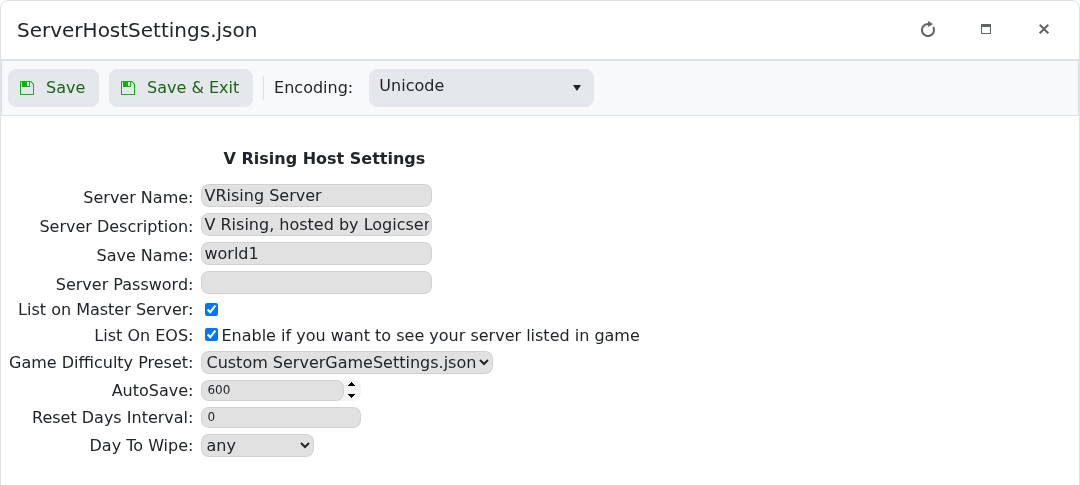
- Use Config Editor next to
ServerGameSettings.jsonfor gameplay settings such as PvP/PvE mode, castle damage, PvP protection, teleport-bound items, global chat, stack modifiers, and drop modifiers.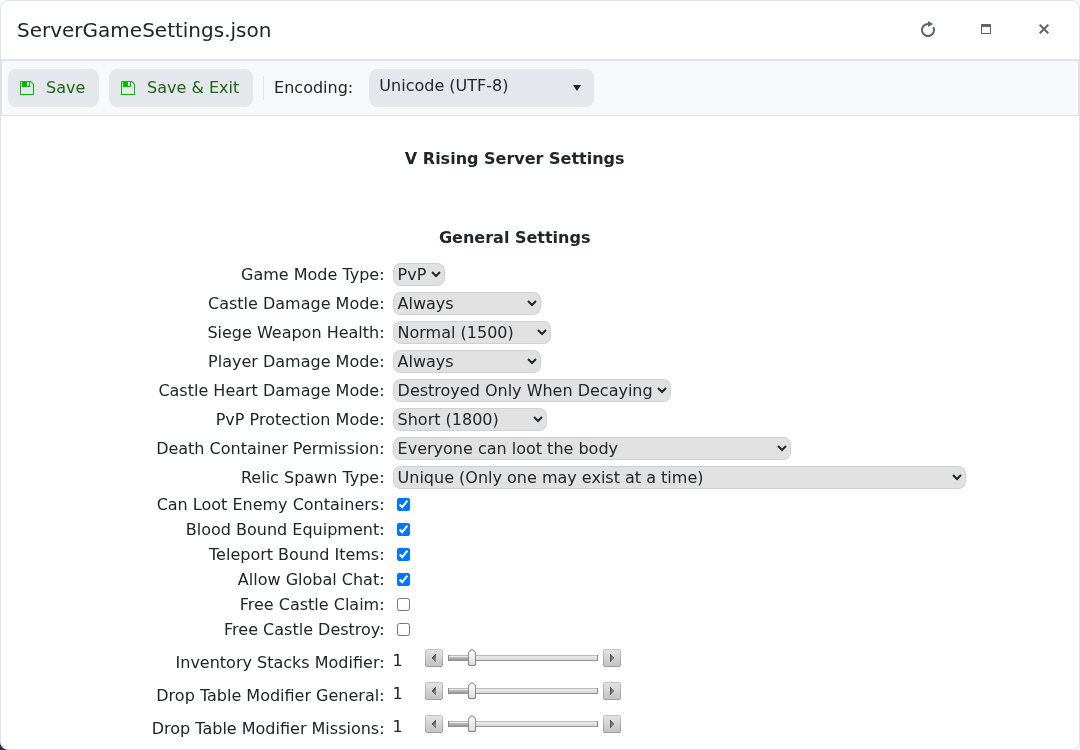
- Click Save & Exit, then start or restart the server.
ServerHostSettings.json
This file controls how the server is listed and which save folder it loads.
| Setting | What it does |
|---|---|
Server Name | The name players see in the V Rising server browser. |
Server Description | Short description shown for the server. |
Save Name | The save folder the server loads from save-data/Saves/v4. Change this to generate or load a different world. |
Server Password | Password players must enter before joining. Leave blank for no password. |
List on Master Server | Controls whether the server is listed in the main server browser. |
List On EOS | Controls Epic Online Services listing. Leave enabled if you want the server visible in-game. |
Game Difficulty Preset | Selects the difficulty preset or custom game settings file. |
AutoSave | How often the server saves automatically, in seconds. |
Reset Days Interval | Used for scheduled wipe/reset timing if configured. |
Day To Wipe | The day used with the reset interval setting. |
ServerGameSettings.json
This file controls the world rules and gameplay behaviour.
| Setting | What it does |
|---|---|
Game Mode Type | Sets the server to PvE or PvP. |
Castle Damage Mode | Controls when castles can take damage. |
Siege Weapon Health | Changes siege weapon durability. |
Player Damage Mode | Controls when players can damage each other. |
Castle Heart Damage Mode | Controls when castle hearts can be damaged or destroyed. |
PvP Protection Mode | Sets the new-player PvP protection duration. |
Death Container Permission | Controls who can loot a player death container. |
Relic Spawn Type | Controls relic uniqueness and spawn behaviour. |
Can Loot Enemy Containers | Allows or blocks looting enemy containers. |
Blood Bound Equipment | Controls whether equipment remains with a player on death. |
Teleport Bound Items | Controls whether certain items block teleporting. |
Allow Global Chat | Enables or disables global chat. |
Free Castle Claim | Controls whether castles can be claimed without the usual cost. |
Free Castle Destroy | Controls whether castles can be destroyed freely. |
Inventory Stacks Modifier | Multiplier for inventory stack sizes. |
Drop Table Modifier General | Multiplier for general item drops. |
Drop Table Modifier Missions | Multiplier for mission-related drops. |
Change a few settings at a time and test the server after each larger change. If the server fails to start after editing JSON by hand, restore a backup or contact support with the setting you changed.


