
There are two clean ways to wipe a V Rising server. Delete the current save folder from save-data/Saves/v4, or change Save Name in ServerHostSettings.json so the server creates a new save folder when it starts.
- Open your V Rising server in the control panel and stop the server.
- Take a backup first: How to Backup your V Rising Server.
- Click File Manager, then open
save-data/Saves/v4. The folders insidev4are your V Rising saves.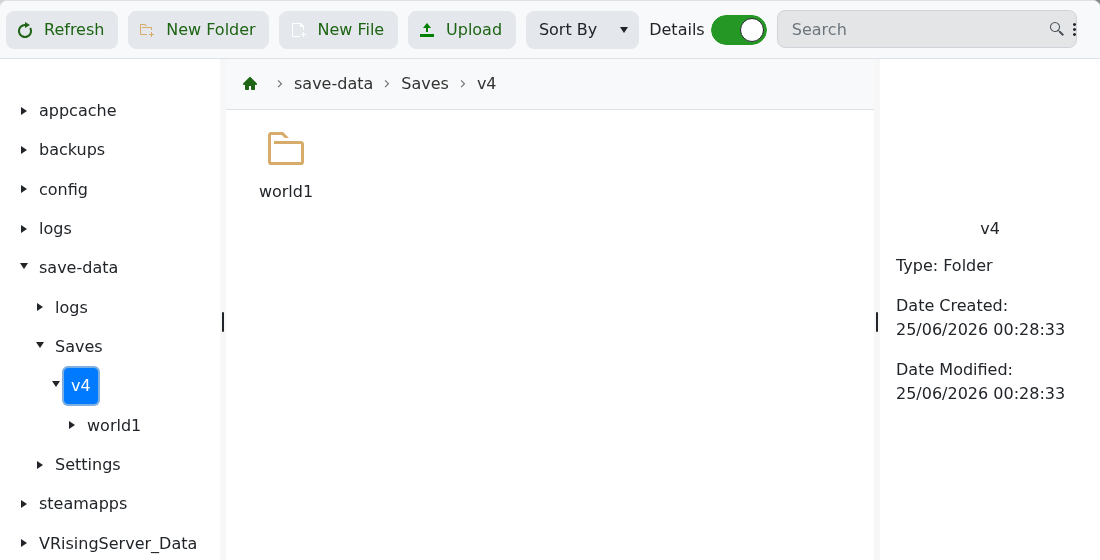
- To wipe the current save, delete the save folder you want to remove. In the example screenshot, the save folder is
world1. - Alternatively, leave the old folder in place and go to Configuration Files, then open
ServerHostSettings.jsonwith Config Editor. - Change Save Name to a new folder name, for example
world2. When the server starts, V Rising will create and use that new save instead.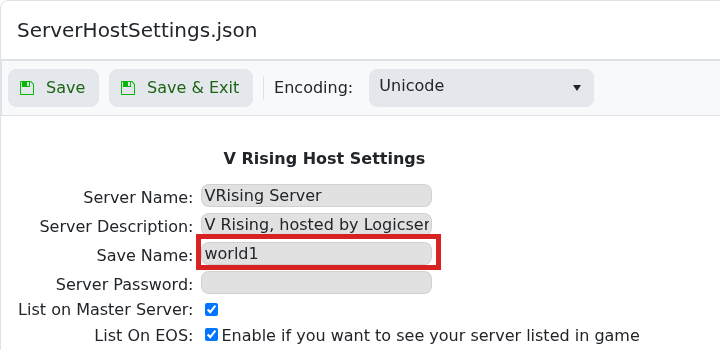
- Click Save & Exit if you changed the save name, then start the server.
If you only need to change gameplay rules for the next wipe, use How to change your V Rising server settings before starting the fresh world.


